Welcome to Nihao AI!
Put the world's top AI to work for you
Quick Start Guide
Start using AI in 3 simple steps
Open the Website
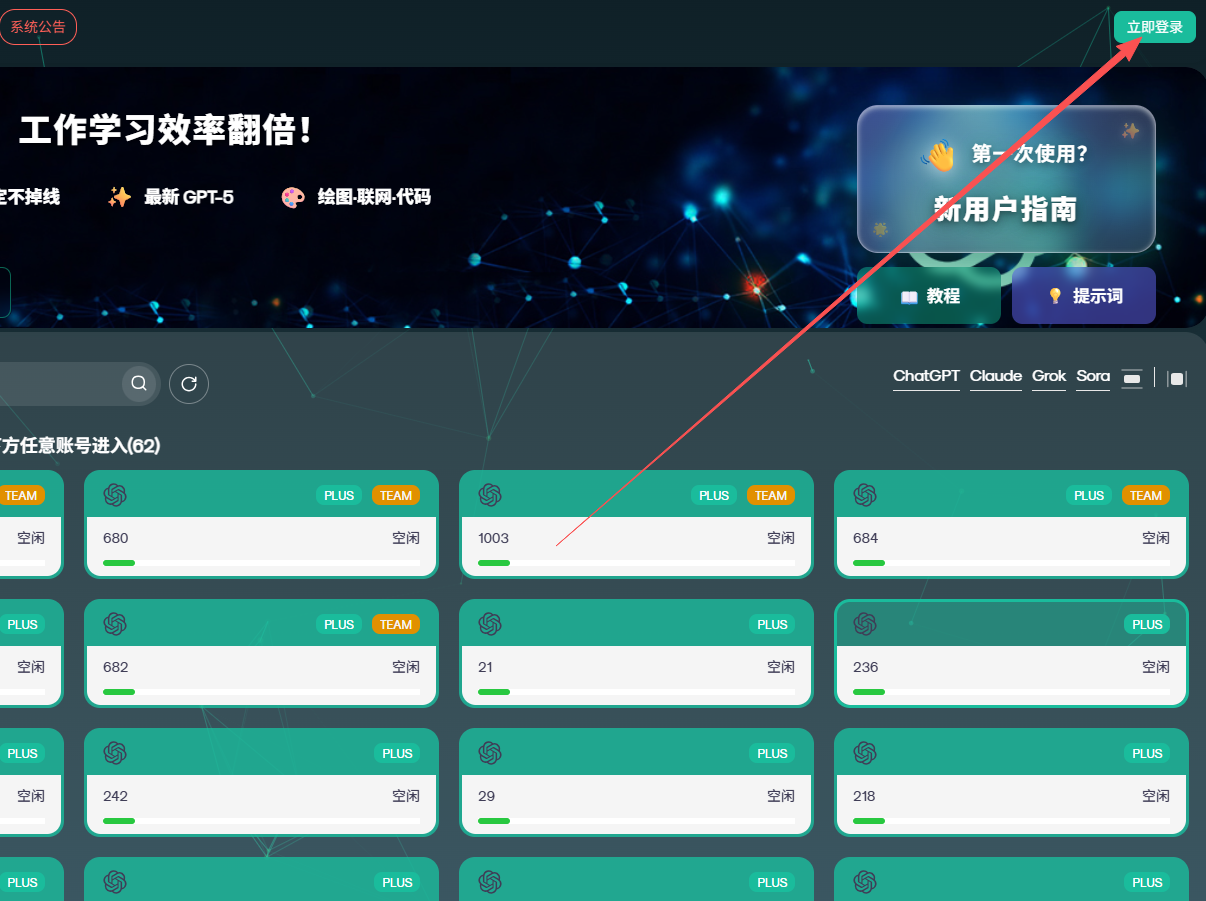
Enter the URL<strong><a href="https://nihao-ai.com" target="_blank" style="color: var(--primary-color); text-decoration: none; border-bottom: 1px solid var(--primary-color);">nihao-ai.com</a></strong>, After entering the Nihao-AI platform homepage, click the "Log In Now" button in the upper-right corner
Log in to your account
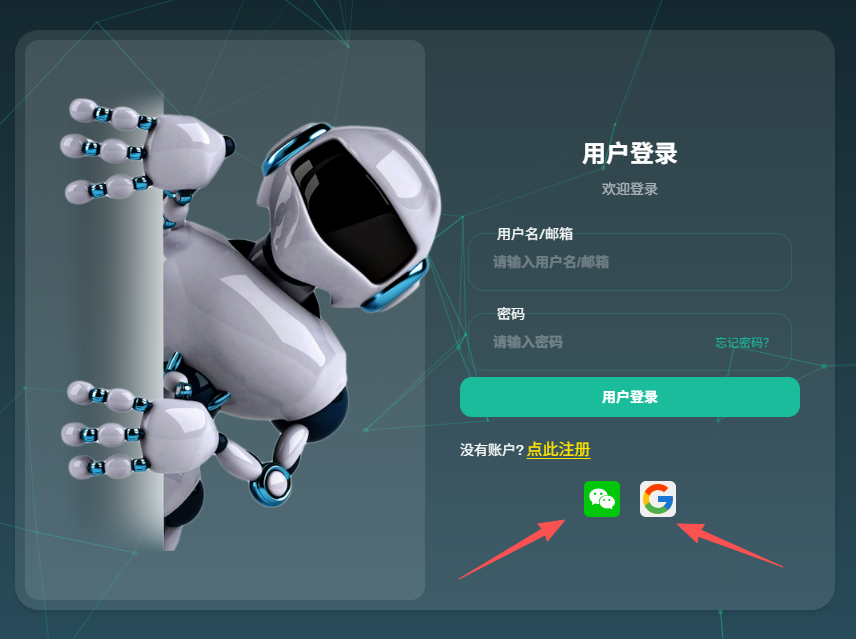
Recommended method:Sign in with WeChat QR code or Google(New users will be registered automatically for a fast and convenient experience.) You can also log in with an account and password, then complete verification using an email verification code.
Choose and start using AI
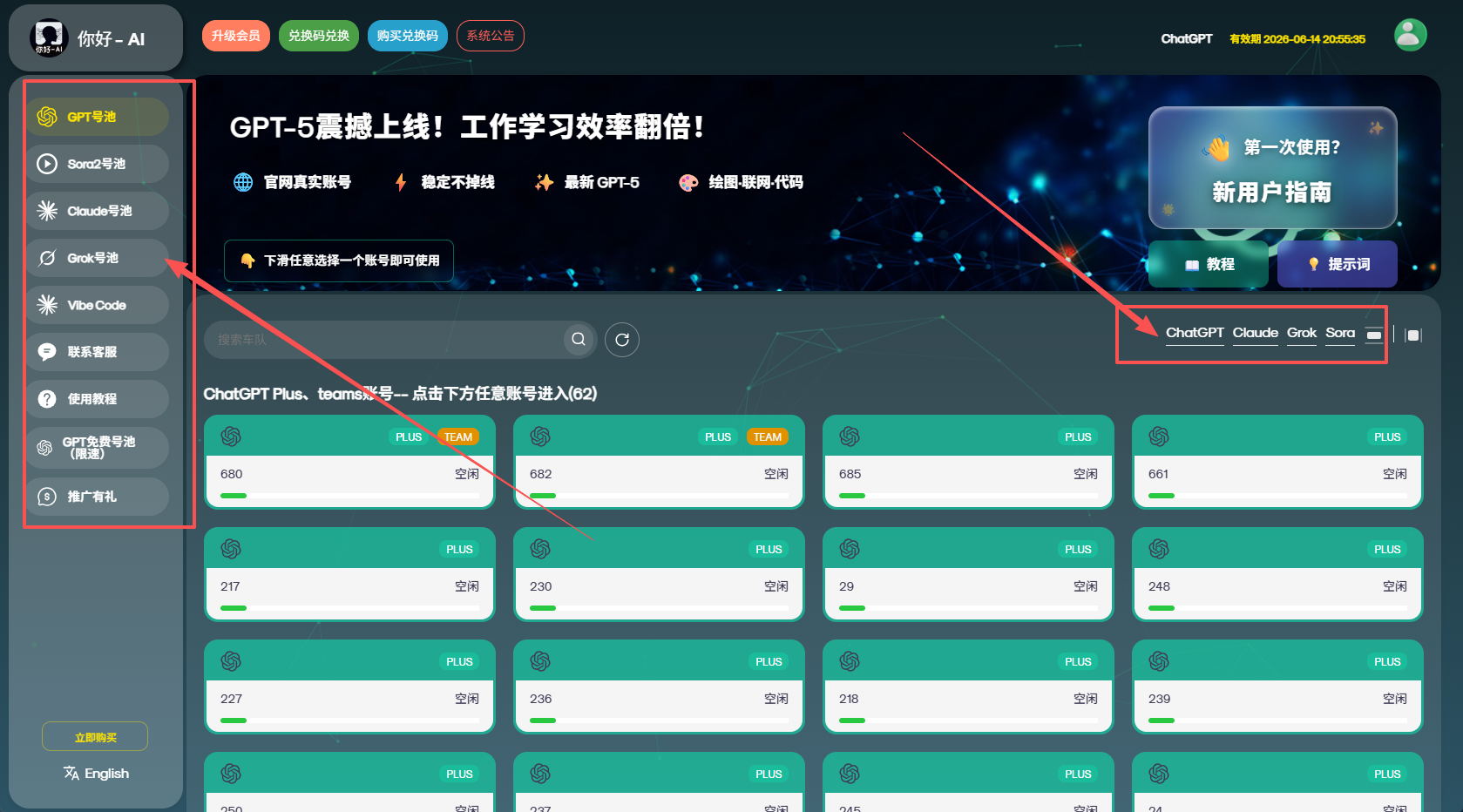
Select the AI you want to use (such as ChatGPT, Claude, or Grok) from the left navigation bar, then scroll down to the account pool and choose any account to get started. The Plus and Teams accounts in the GPT account pool are official subscription accounts that provide access to the latest models and features.
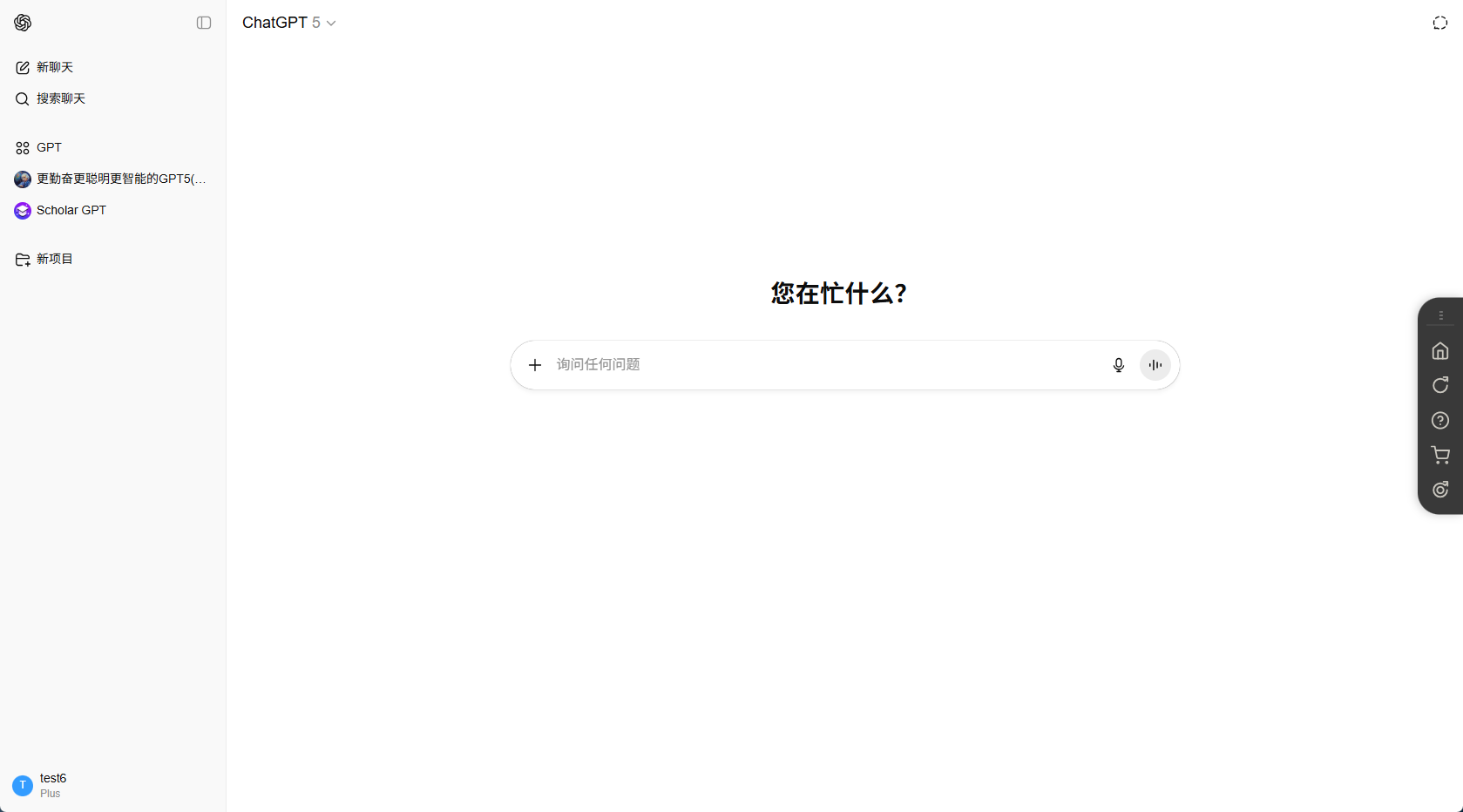
After clicking an account, you will be automatically redirected to the corresponding AI’s official website, where you can directly ask questions in natural language and start exploring.
If you’re enjoying this site, you can choose to upgrade your membership in the upper-left corner of the homepage and activate your preferred AI plan.
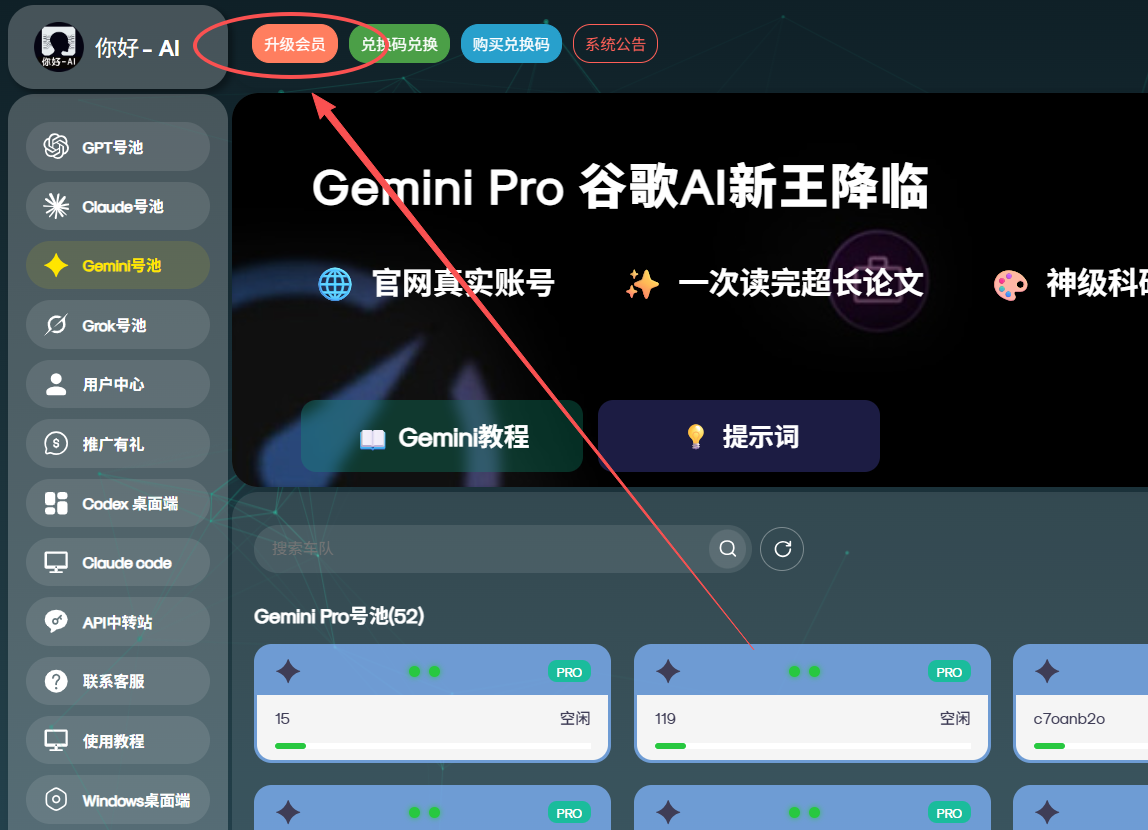
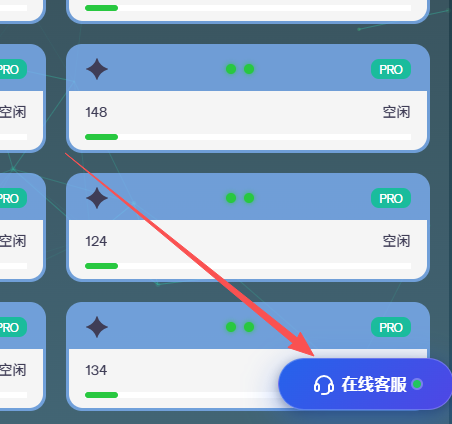
If you encounter any issues while using it, you can return to the homepage and wait about 3 seconds; an Online Support button will appear. Click it anytime to get help.
AI User Guide
Find the AI that best suits your needs for each scenario and quickly learn how to use it
Scenario Recommendation CardsChoose an AI based on your use case
Everyday Office Work
Write emails, create PPTs, analyze data, and process documents
Academic Writing
Paper writing, thesis projects, literature reviews, and academic translation
Programming & Development
Code writing, bug fixing, architecture design, and code optimization
Real-Time Information
Track trending topics, search for information, conduct market analysis, and summarize news
Video Creation
Short-form video production, special-effects editing, and AI video generation
Content Creation
Novels, screenplays, marketing copy, and creative planning
Data Analysis
Report creation, data visualization, and trend forecasting
Language learning
Translation, speaking practice, grammar correction, and vocabulary learning
Nihao AI Account Pool Site — Detailed AI How-to Guides
Direct-link module: Feature retained but hidden?ai=grok or #grok formats.Hehe~(˶‾᷄ ⁻ ‾᷅˵) Secretly at the very bottom of the guidetucked in a ChatGPT redemption code 🎁✨ If you’ve finished reading, don’t forget to claim it~This is your exclusive reward (/≧▽≦)/
GPT Usage Guidelines (Important)
Guideline 1: Plus and Teams Account DetailsBoth Plus and Teams accounts listed in the account pool are available
• Plus account:Official website subscription: $20/month
• Teams account:Official website subscription: $25/month
• Both use the latest GPT-5 model with full functionality

Hit the usage limit? Tap One-Click Account Switching
When you see "The current account has reached its model usage limit" or encounter an issue with your account:
- Click the "One-Click Account Switching" button in the upper-right corner.
- After the system automatically switches accounts, continue chatting in the new conversation (⚠️ Do not return to your chat history).
Need to continue the previous conversation?
Click the gear button, then click "Switch account to continue chatting". When you ask a question in a new conversation, memories from the previous chat will be carried over automatically (⚠️ Do not click back to chat history) ✨

Check the remaining quotas for image generation/file uploads/advanced features for the selected GPT account
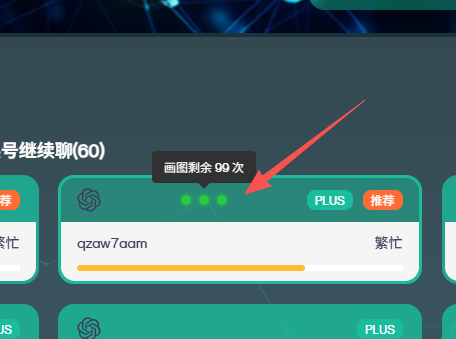
• On the account selection page, move the mouse over the three small green dots to see the remaining quota for that GPT account. Simply select and enter an account with sufficient quota. After switching accounts, ask your question in a new conversation (do not click back to chat history).
Move the mouse over the three small dots above the account number to view the remaining quotas for image generation and other features
On the account selection page, move the mouse over the three small dots above an account to view its remaining quotas for image generation, file uploads, and other features, then select and enter an account with sufficient quota.
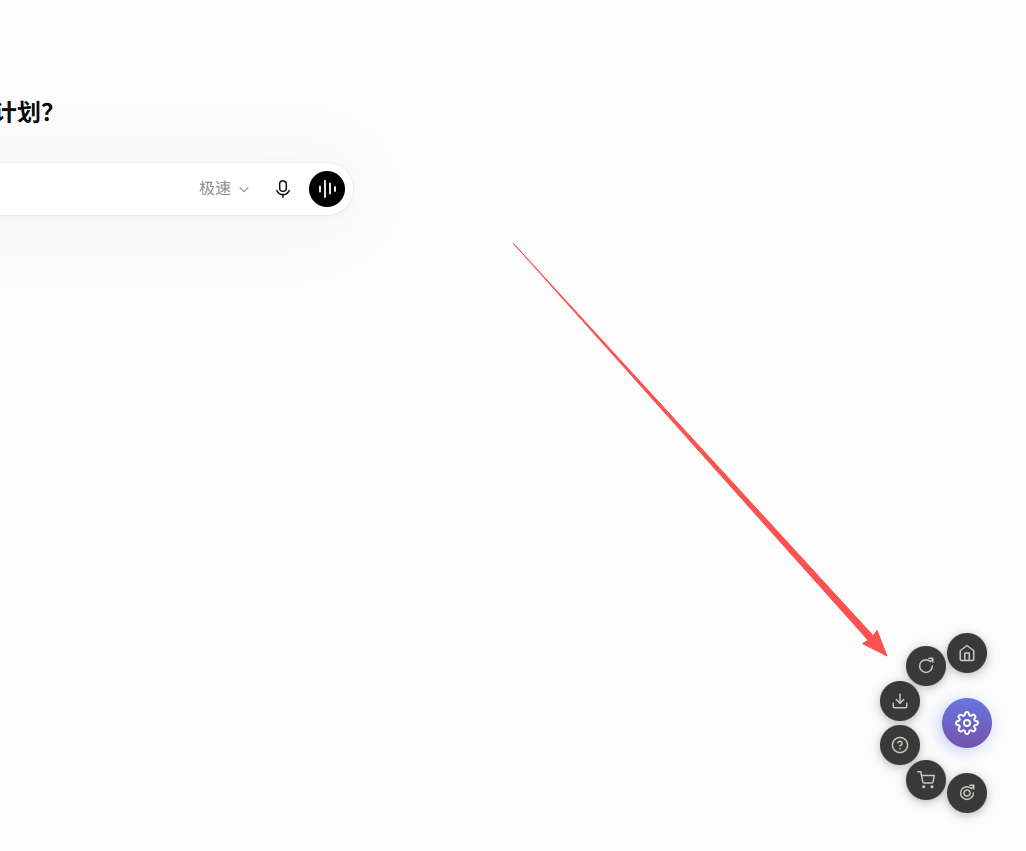
GPT shortcut menu button
After entering the chat page, click the gear button, and the shortcut menu will expand, allowing you to switch accounts, download conversations, get help, access the shopping cart, and use other related features.
📊 Full-capability, no-degradation experience: Prioritize accounts near the front of the account pool
- Prioritize accounts with the red tag: The system automatically detects low-quality accounts and moves them to the back of the list.
- Dual top-tier gateway protection:U.S. residential IPs + smart switching to reduce the risk of detection
- Ultimate backup option:Your last line of defense: you can use the full-capability official relay model(See the introduction below for details)
ChatGPT Plus Introduction
ChatGPT is a large language model developed by OpenAI. Plus members can access more powerful models and features, such as data analysis, voice, and images.
✨ GPT-5 Family
Comprehensive features and powerful capabilities
🌐 Web Search
Get real-time information
🎨 Image Generation
Generate and edit images
🎙️ Voice Mode
Real-time voice conversations
📊 Data Analysis
Upload and analyze files
🔧 GPTs Apps
Discover custom GPTs in the store
ChatGPT Plus High-Value Features
- File → Analysis: Simply drag and drop Excel / CSV / PDF files to automatically build models, create interactive charts, and explain anomalies.
- One-click demo: From topic toPPT/Word/Excel outline and speaker notes, complete a first draft in 1 minute.
- Image and document multimodal understanding: Tables, handwritten photos, and flowcharts can all be recognized and converted into structured key points.
- GPTs Store: Millions of free tools designed to solve specific tasks—remember to explore them!
- Voice feature: Can be used for chat companionship, psychological counseling, foreign language practice, role-play simulations, and more.
- Image generation: Create images in the viral Ghibli style and edit images based on the original.
- Deep research: Generate professional reports based on information from across the web.
- Agent mode: Let GPT operate like a human: open webpages, click, type, fill out forms, search, and help you complete the tasks you want.
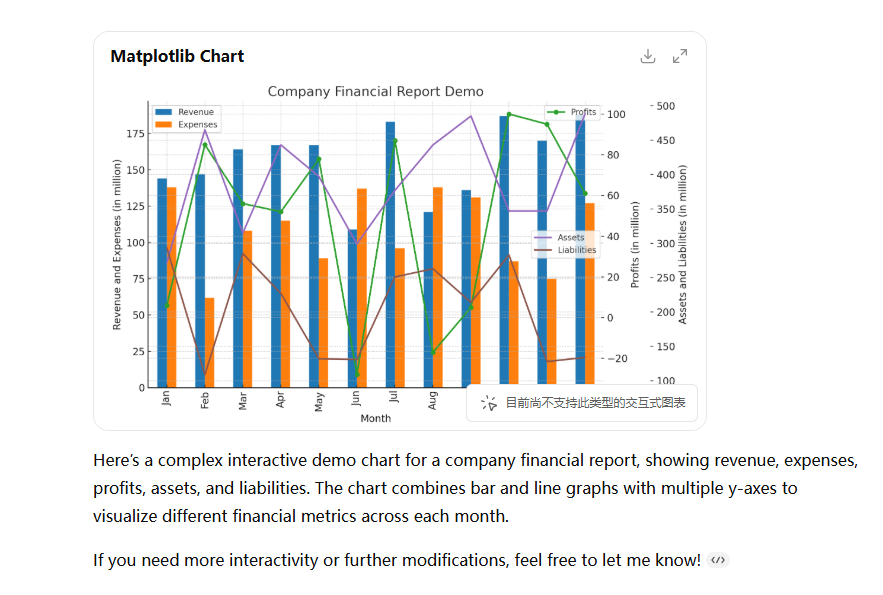
- Interactive charts and data analysis: After generating a chart, switch to an interactive view for filtering and cross-filtering.
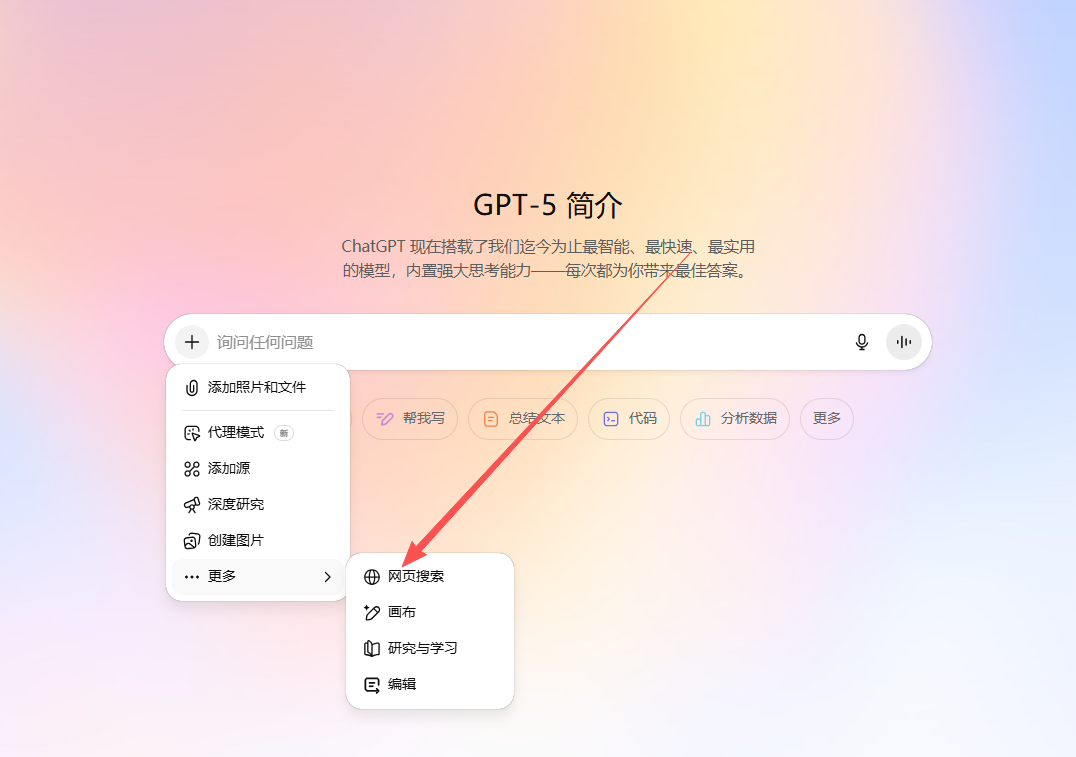
- Web search: Search and summarize the information you need from across the web.
Featured Optimizations on This Site - Take Your Experience to the Next Level
Part One: Full Feature Integration✅ Full Integration of All GPT Plus Advanced Features
This site fully integratesAgent Mode, Advanced Voice, Canvas, Deep Research, Data Analysis, Image Generationand all other GPT Plus advanced features. If you can use it on the official website, you can use it here—nothing is left out, and the experience is exactly the same!
🛡️ Our Triple-Layer Quality Protection System
We have invested heavily in building athree-layer technical protection systemthat provides comprehensive protection for the stability and quality of AI services—from network nodes and account monitoring to backup solutions.
Triple-Layer Protection CardsU.S. residential IP nodes + intelligent switching simulate a genuine user environment, reducing the likelihood of being identified by the official system as "high-risk traffic"
✓ Bypasses proxy traffic detection
✓ Enjoys the same treatment as U.S. users
The system automatically checks the quality of accounts in the account pool at regular intervals and ranks accounts that have not experienced quality degradation first based on output quality scores
✓ Automatic ranking optimization
✓ Defers problematic accounts for later processing
The costly ultimate backup option, connecting directly to official servers as the last line of defense
✓ 100% feature-complete
✓ Switch to it when it matters most
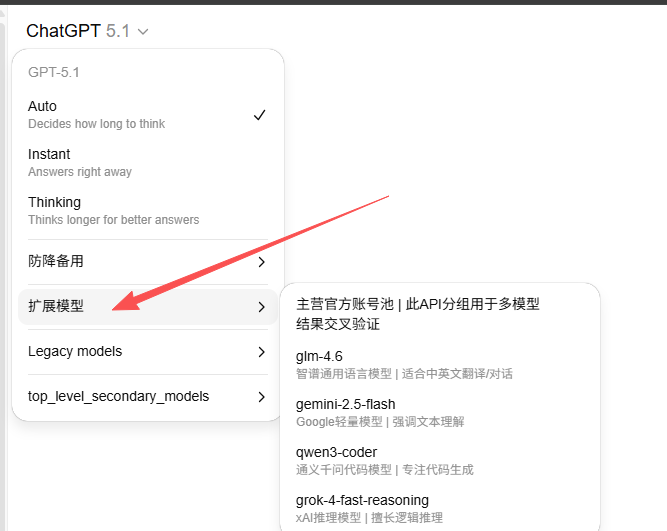
Extended Models: Cross-Validation & Downgrade Protection
To enhance your experience, we provide GPT model switching with several additional API models from leading global AI providers, making it easy to:
When faced with complex questions, quickly switch between different AI models to compare answers and ensure accuracy
If your account's capabilities are downgraded, switch accounts or switch to a Full-Strength Official API model
Note: Models in the extended group use the API integration method and are provided solely as an auxiliary feature.
✅ Core guarantee: All paid AI account pools for GPT / Claude / Grok / Sora and more are all direct official website subscription accounts with full functionality and no omissions.
🔄 Solving a major pain point of account pool sites: Switch accounts and keep chatting—with seamless context continuity
A long-standing problem with account pool sites: You can't continue a previous conversation after switching accounts? We have exclusively developed the "switch accounts and keep chatting" feature!
✨ When you need to switch accounts because the current account has reached its usage limit, the system will automatically carry over your context memory, allowing you to seamlessly continue your previous chats on the new account, as if you had never been interrupted—the ultimate seamless experience!

☁️ Cloud record protection—never worry about losing your data, even if your account is banned
Official websites may occasionally ban accounts, and storing chat records on the official account can result in their permanent loss. We optimized our service to address this pain point:
- Encrypted cloud storage: All chat records are automatically backed up to the cloud, so they won't be lost even if the account is banned
- Third-party encryption technology: We use industry-standard encryption solutions,No one (including us) can view your chats—100% privacy and security guaranteed 🔒
- Automatic cleanup:Records will be automatically deleted after 40 dayswith no trace left behind
Friendly reminder:Please promptlyexport and save important long-term chat records (over 40 days) locally
Basic Usage Guide
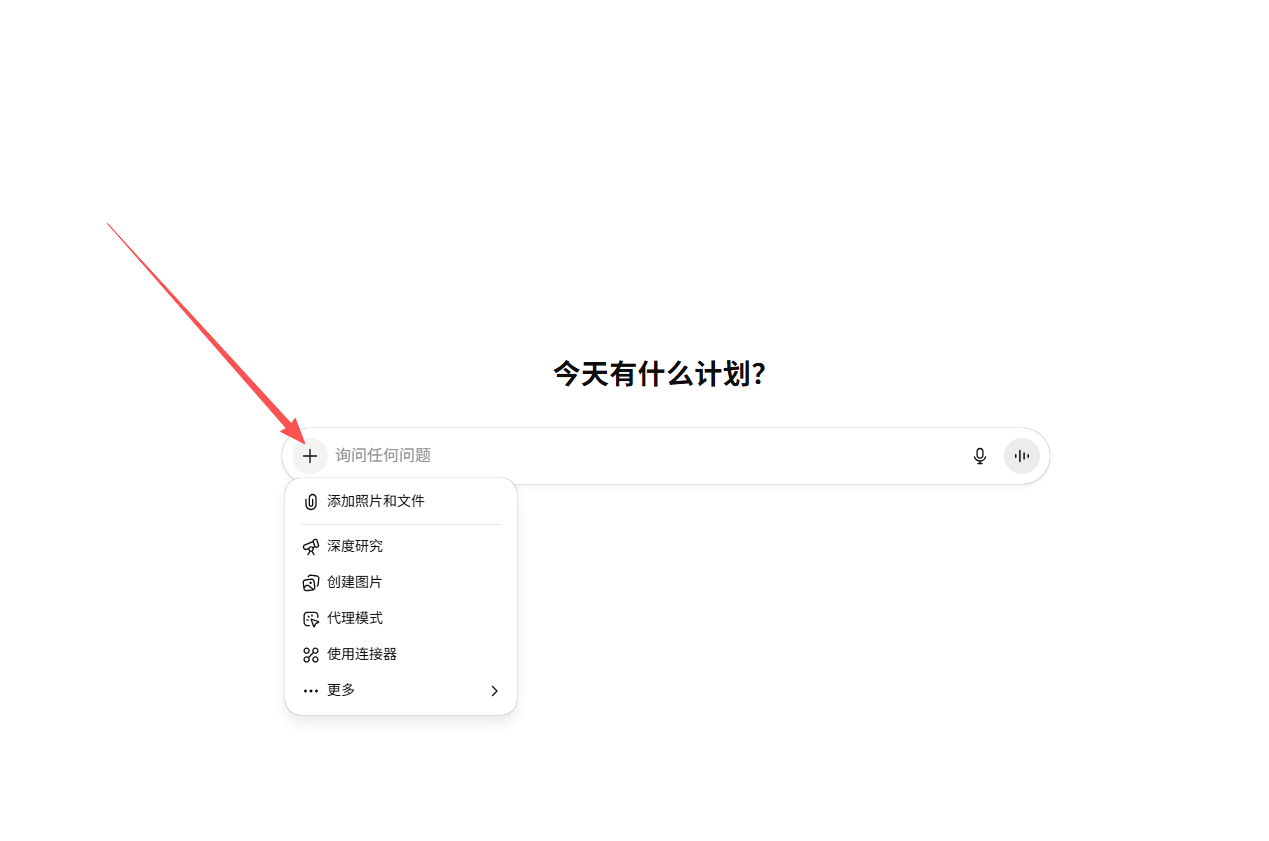
1) How to upload files
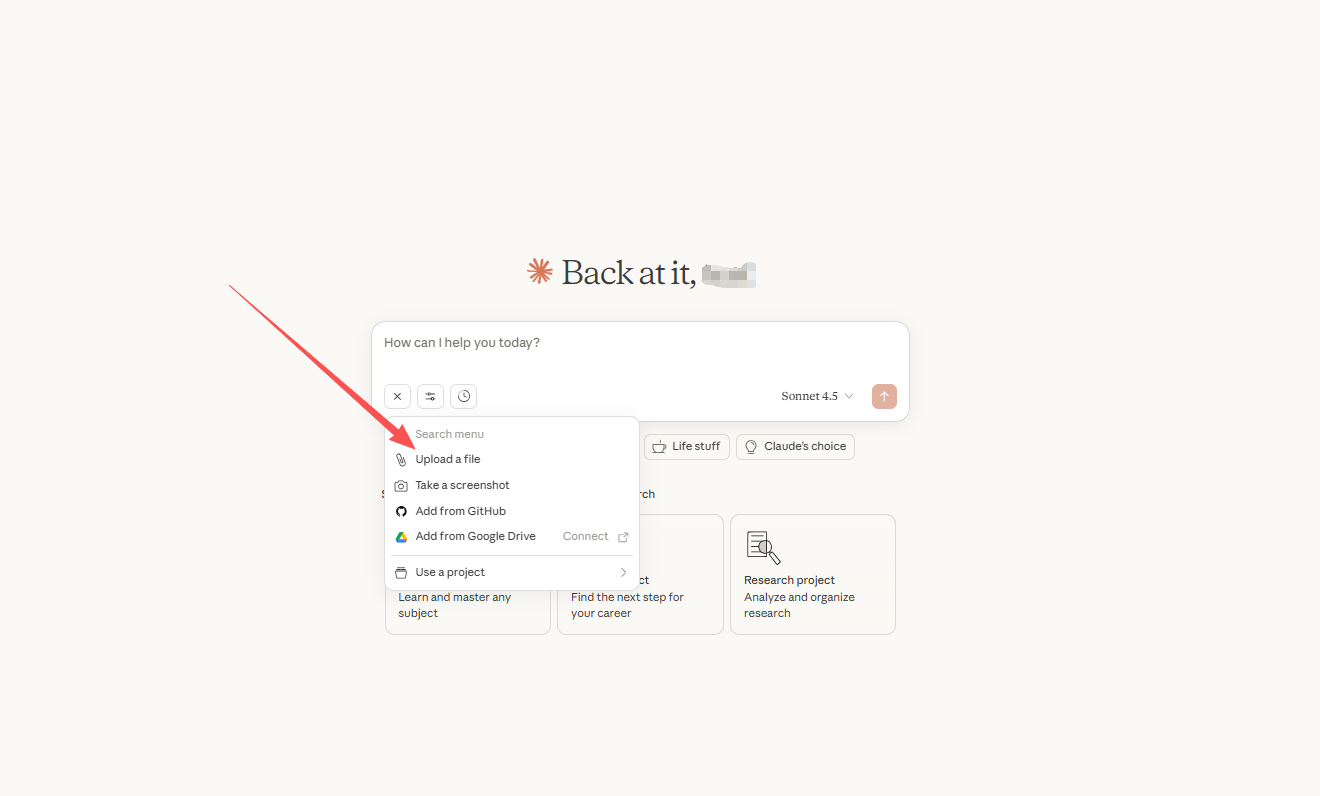
- Open any conversation and click the"+/paperclip"icon on the left side of the input box, then select Upload file(multiple selections allowed).
- You can also drag and drop files directly into the input box.
- After sending, ChatGPT will automatically read and analyze the content of the images/files.
2) File types and limits (common maximums)
- Supported formats:Excel (.xlsx), CSV, PDF, Word (.docx), TXT, JSON, images (PNG/JPG), etc.;
- Size limit: Approximately 50MB;
- Quantity limit:You can upload multiple files in a single conversation (the exact number depends on your account quota).
Note:If you see a message saying that the upload failed, try: 1: Click One-Click Account/Vehicle Switch to continue chatting, then ask your question in the new conversation window. 2: Switch networks.
3) View and manage chats in the sidebar
After logging in, all conversations will appear in the history panel on the left. Hover over a conversation to rename or delete it.
Advanced Features
1) Web browsing (get the latest information)
- Clearly state in your question: "Please search the web and provide source links."
- ChatGPT will automatically search the web and cite the latest information.
💡 Tip:Click here to force-enable web browsing
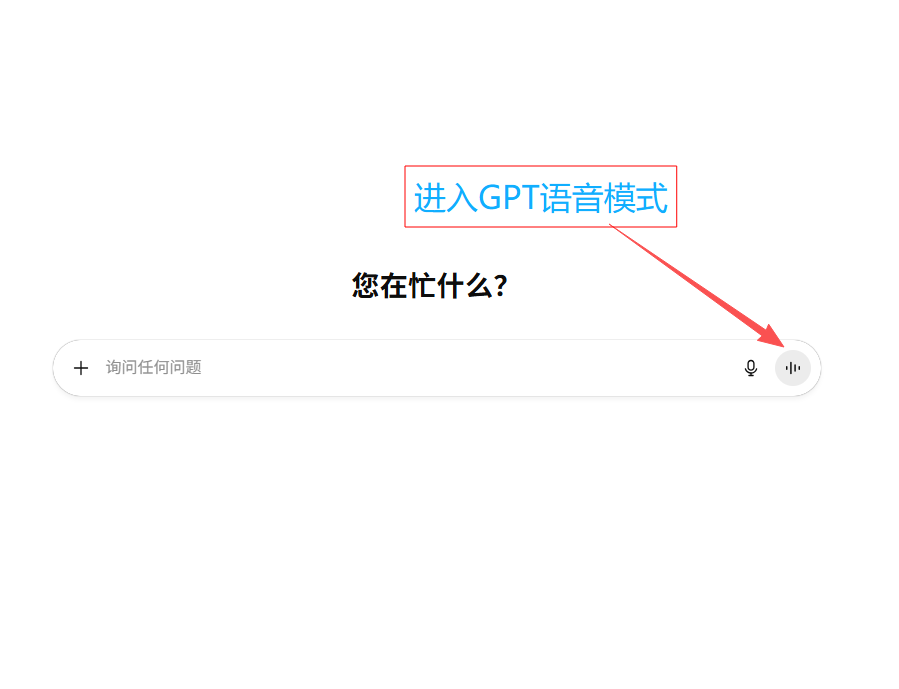
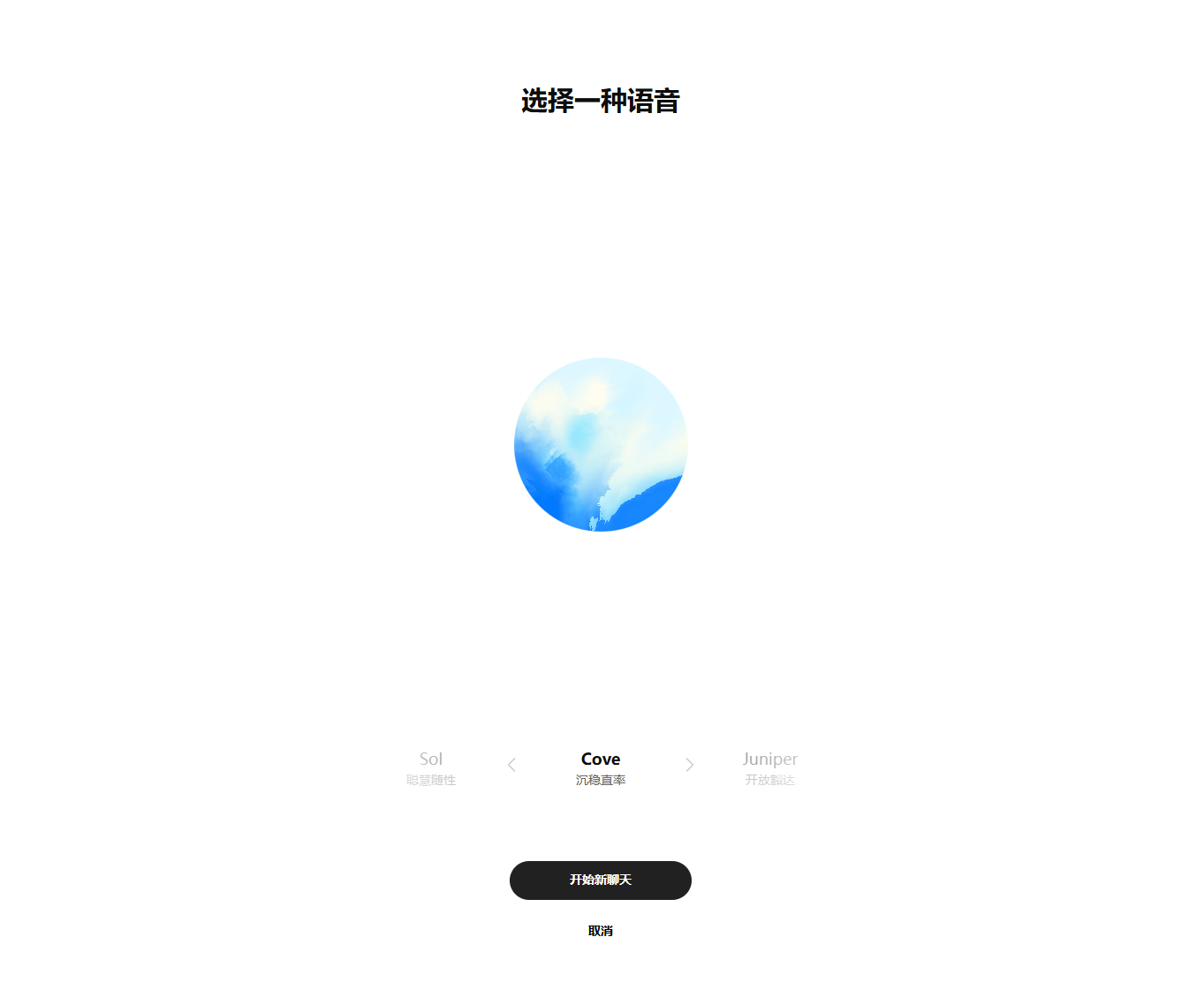
2) Voice mode
- How to use:Click the microphone icon to the right of the input box and start speaking after granting permission.
- Use cases:Foreign-language practice, speaking practice, role-play simulations, and more.
3) Image generation and editing
- Generate images:Enter a command such as "Generate an image of..." directly, and optionally specify parameters such as style, composition, and resolution.
- Edit images:Click "+" in the dialog to upload an image, then analyze or edit it (brush, replace, expand, etc.).
- Popular styles:Ghibli style, cyberpunk, ink wash, 3D rendering, and more.

4) Data analysis and chart interaction
After you describe your requirements, ChatGPT automatically generates a chart. Once the chart is generated, click the top-right corner of the chart Switch to interactive chart, supporting interactive formats such as bar, pie, scatter, and line charts, with options to filter, cross-filter, and export data.
Advanced features
1) Use GPTs (Store)
GPTs are ChatGPT's "app store," containing millions of specialized AI assistants designed to handle specific tasks.
- Click the left sidebar Explore GPTs to enter the store.
- Search for keywords (such as "academic writing," "data analysis," or "coding assistant") and open a suitable GPT.
- Some recommended GPTs will appear here in the illustration. You can hide them to keep the interface clean.

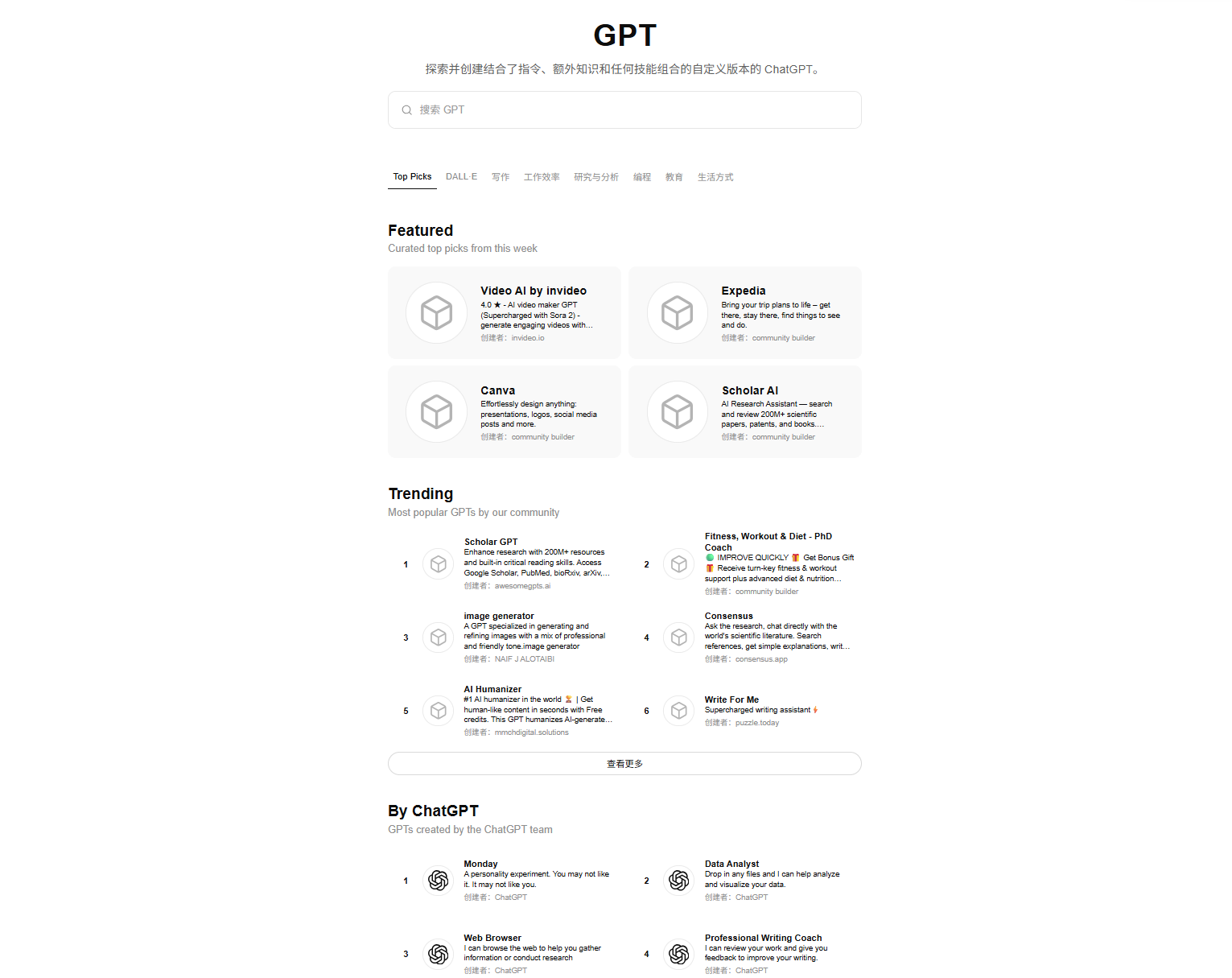
💡 Recommended GPTs for literature reviews/writing: consensus/scispace/scholar gpt/ai humnanizer
2) Agent mode (AI operates a virtual computer)
Agent mode = AI now has a virtual computer! GPT creates a virtual desktop + virtual browser and operates them like a person: opening webpages, clicking, typing, filling out forms, and searching to help you complete the tasks you want.This site is fully integrated with this feature.
- Click the "+" icon on the left side of the input box.
- Check the "Agent mode" option.
- Describe your task (e.g., "Search Amazon for Bluetooth headphones and compare prices").
- GPT will automatically open the browser, interact with webpages, and return the results.
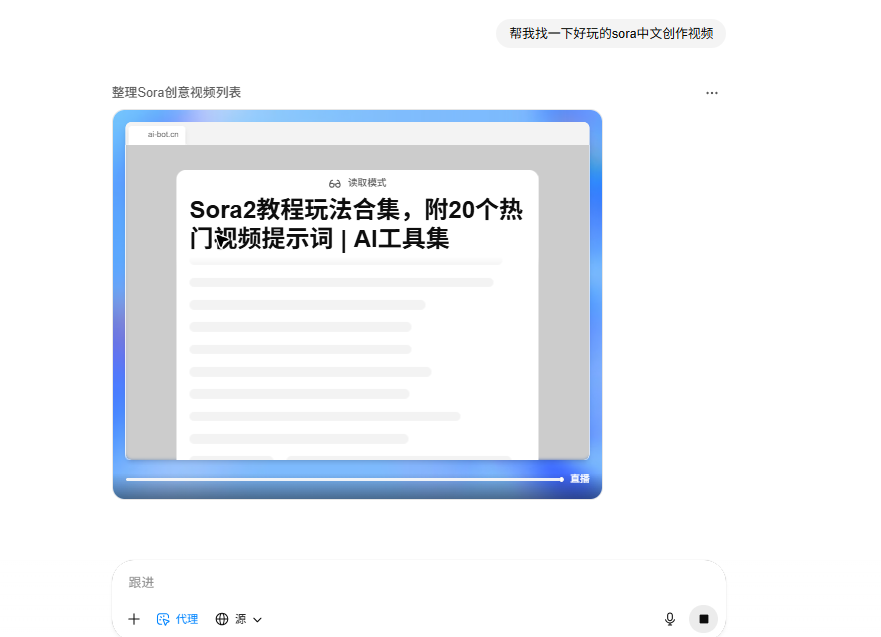
Note:Agent mode is suitable for complex, multi-step tasks such as filling out forms, scraping webpages, and automating operations.
Model overview (tutorials may not always be up to date; please refer to the latest official models currently available)
GPT-5.1(auto)Flagship
Advanced cross-domain reasoning, suitable for complex requirements and agent scenarios.
GPT-5.1(instant)
Faster responses for reliably handling routine, procedural tasks.
GPT-5.1(thinking)
Features a thinking capability for complex tasks that require logical reasoning.
o3 / o3-mini/ GPT-4.1, etc.
Legacy models that can still be enabled under [More models] but are no longer recommended.
GPT-4o
The previous-generation flagship product.
Claim ChatGPT perks
4f5bd4dcb3b74bc0bacafd068d92ce60
- Click "Redeem Code" on the homepage
- Paste the redemption code
4f5bd4dcb3b74bc0bacafd068d92ce60 - Click "Redeem" to complete
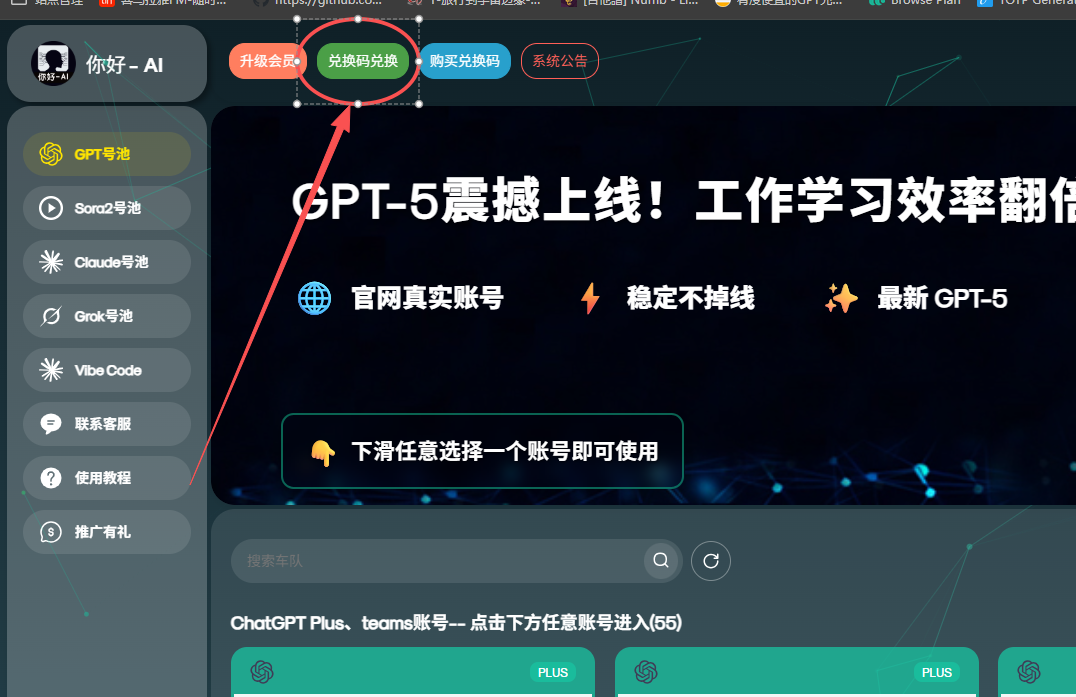
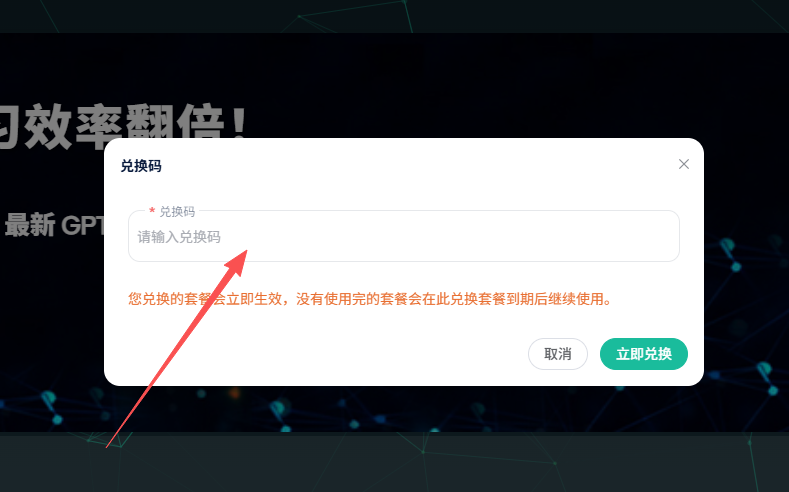
nihao-ai.com
- Click [Upgrade Membership] on the homepage
- Select the plan you need (valid for all plans)
- Paste it into the promo code field
nihao-ai.com - Click Verify Promo Code
- Click [Submit] to complete payment
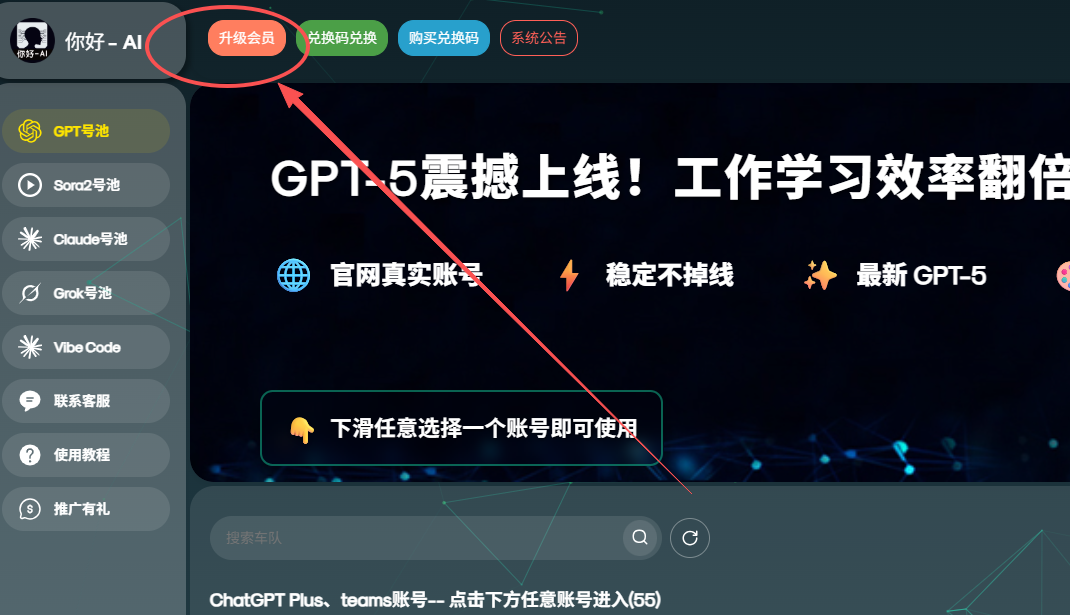
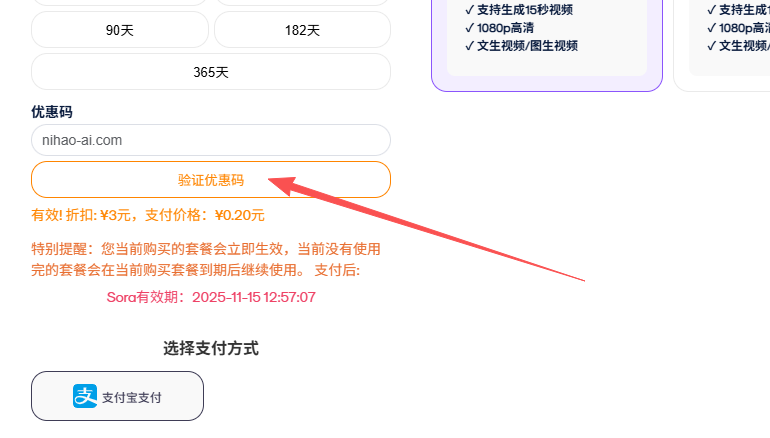
View Other AI Tutorials

Psst:Scroll to the bottom of the tutorialThere's something good hidden there Grok Membership Redemption Code 🎁 Go try it out!
About Grok
Developed by xAI, Grok is an AI assistant focused onreal-time internet accessandDeep researchBacked by Musk's deployment ofthe world's largest computing cluster, combined with the vast amount of data on the X platform, Grok can break through the information silos of traditional AI to provide you with the freshest, deepest, and most authentic information.
💪 Powerful Computing Support
Musk has deployed a massive number of processors, surpassing those of other AI companies, giving Grok industry-leading computing power
🌐 Deep Online Search
Connects to platforms such as X in real time to access first-hand news and social media updates
🔓 Fewer Censorship Restrictions
Compared with other AI, Grok can explore cutting-edge topics in greater depth
🔍 Deep Search
Cross-validates information from multiple sources, uncovers deeper insights, and is suitable for academic research and intelligence analysis
📊 Real-Time Data Advantage
Real-time updates on financial markets, breaking news, and policy developments
🎯 Expert Mode
Expert Mode provides more professional, in-depth analysis

Grok's Core Advantages
Advantage 1: Exceptional Computing PowerMusk's Computing Empire
Elon Musk built for xAIone of the world's largest AI training clusters, deploying more than 100,000 NVIDIA H100 GPUs(the Colossus supercomputer), with computing power far exceeding that of most competitors. This means:
- Faster response times:A smooth experience even during peak periods
- Stronger reasoning capabilities:Handles complex logic and multi-turn conversations without missing a beat
- Continuous iteration and upgrades:Its computing advantage enables the model to evolve rapidly
Connecting to X, staying in tune with the world
- Firsthand access to breaking events:Get multiple perspectives from eyewitnesses, experts, and media outlets as soon as major news breaks
- Public sentiment and trend analysis:Understand the level of public discussion, sentiment, and evolving trends surrounding a topic
- Expert Opinion Aggregation:Quickly find professional analysis of specific events from KOLs in the field
- Original Data Traceability:Trace information back to its source and avoid being misled by secondhand media
Fewer Censorship Restrictions
- Doesn't Refuse to Answer at the Drop of a Hat:Grok doesn't refuse to answer at the drop of a hat
- Provides Diverse Perspectives:Presents arguments from different standpoints
- In-Depth Exploration of Cutting-Edge Topics:More open discussion of cutting-edge fields such as AI ethics, biotechnology, and cryptocurrency
- Academic Research-Friendly:Ideal for scholars, journalists, and analysts who need comprehensive information
Deep Search: More Than Search—It's Intelligence Gathering
Deep Searchis Grok's killer feature. It's not just a simple keyword search, but instead:
Automatically gathers information from academic databases, news websites, social media, government announcements, and other channels, then cross-checks it to verify authenticity
Understands your deeper needs, automatically expands to related concepts and synonyms, and uncovers hidden connections
Provides complete source links, publication dates, and author information for convenient academic writing and fact-checking
Automatically generates event timelines to clearly present how information evolves
📌 Use Cases:Academic research, industry analysis reports, policy and regulation tracking, competitive intelligence gathering, investment decision support, news fact-checking, and more.
100% Real-Time Information
Other AI tools often have knowledge cutoffs that lag by months or even years, while Grok offers:
- Zero-delay information access:Searches for the latest reports on events as they unfold
- Instant financial market updates:Stock prices, exchange rates, and cryptocurrency prices refreshed by the second
- Policies and regulations as soon as they are released:New regulations and executive orders available immediately after publication
- Never miss scientific breakthroughs:Stay up to date with the latest papers, patents, and experimental results
Core Features Tutorial
① How to Enable Expert Mode
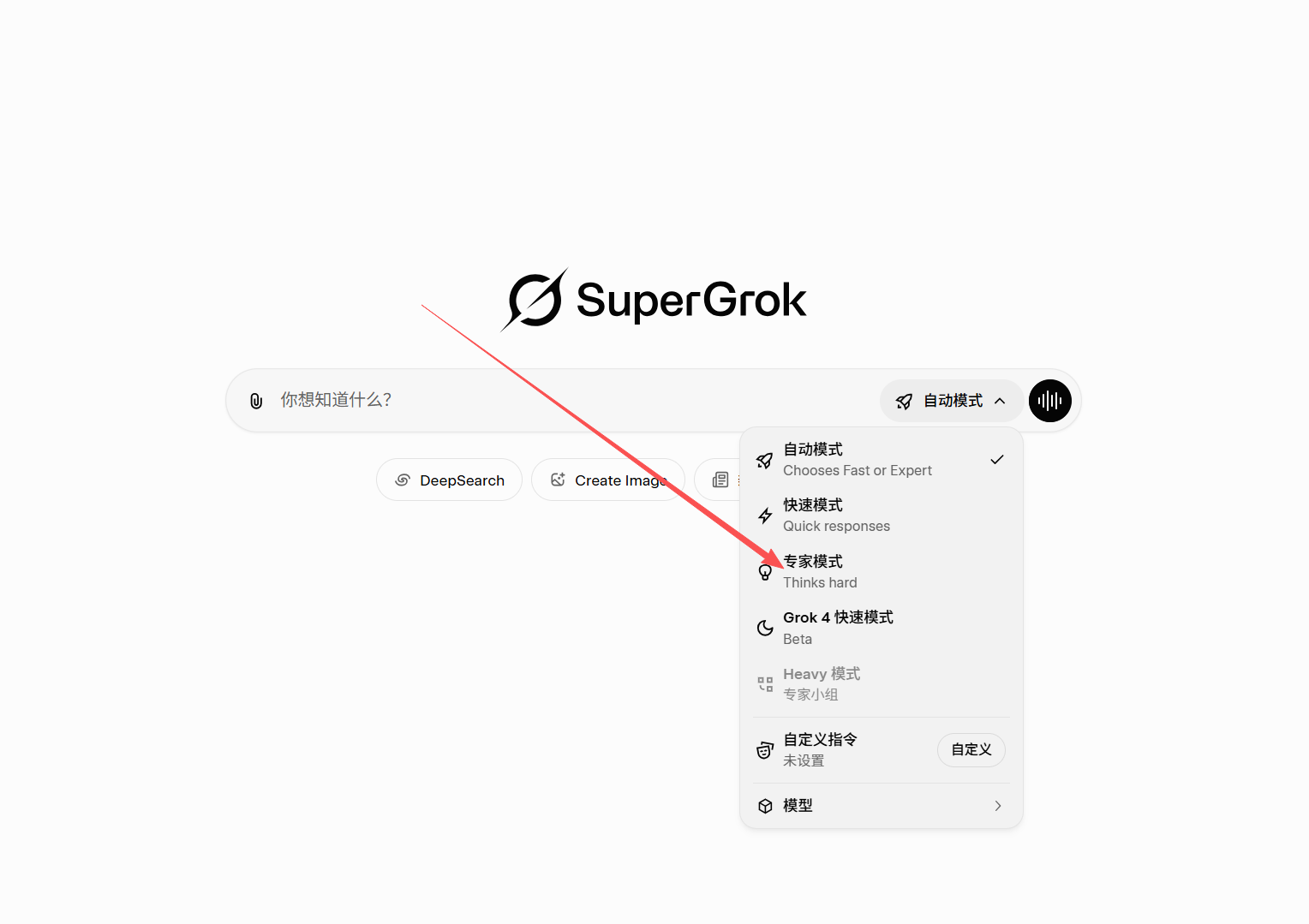
Expert Mode enables Grok to providedeeper, more professional, and more detailedanswers, making it ideal for scenarios that require high-quality output (such as academic research, technical analysis, and business decision-making).
- Above the conversation input box, find themodel selector(Usually displays the name of the model currently in use, such as "Grok 4").
- Click the model selector, then select Expert Mode.
- Once enabled, Grok will provide more technical details, supporting data, and multi-angle analysis in its answers.
💡 Tip:When asking a question, explicitly state requirements such as "I need a detailed technical analysis," and Grok will automatically match them with higher-quality output.
② How to use Deep Search
Deep Search is Grok's flagship feature, capable ofcross-validating multiple sources, conducting in-depth information mining, and automatically generating citations, making it particularly suitable for scenarios requiring high-quality information, such as academic research, industry analysis, and fact-checking.
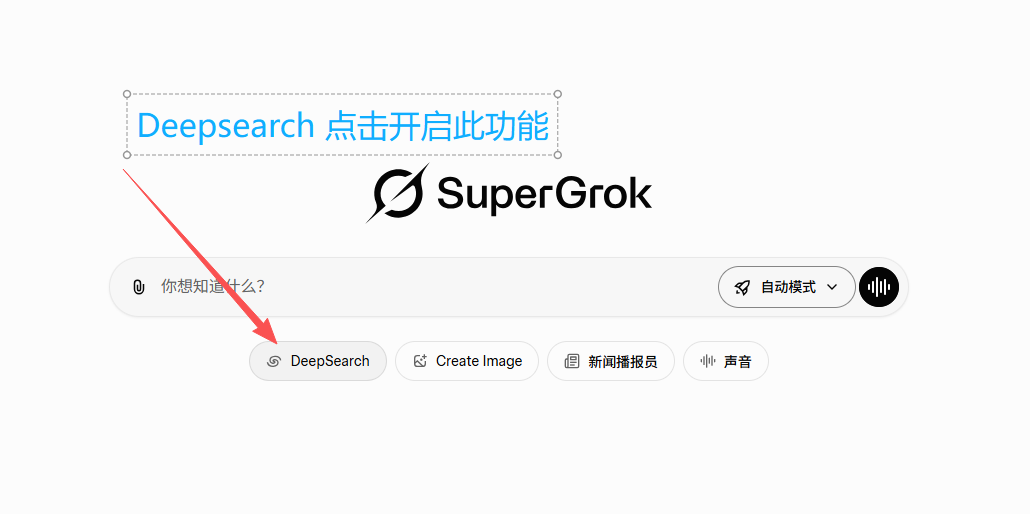

How to enable
- Enter your question in the input box.
- Next tothe Send button(or below the input box), find the Deep Search toggle/button.
- Click to enable it, and Grok will automatically enter Deep Search mode. The search process may take 10-30 seconds.
- Once the search is complete, Grok will provide a detailed information summary and a complete list of sources.
Best practices for Deep Search
For example: "Please conduct an in-depth search for global AI chip market share data in 2024 and provide authoritative sources"
Example: "Search for the latest developments in carbon neutrality policies from 2023 to 2024"
Example: "Please verify this data from three perspectives: academic papers, government reports, and industry analyses"
Example: "Please provide the full links and publication dates for all sources"
③ How to Enable Private Mode
Private Mode is Grok'scompletely anonymous conversation feature. Once enabled, your conversationswill not be saved, used to train models, or leave any trace. It is ideal for situations that require absolute confidentiality, such as handling sensitive information, trade secrets, and personal privacy.
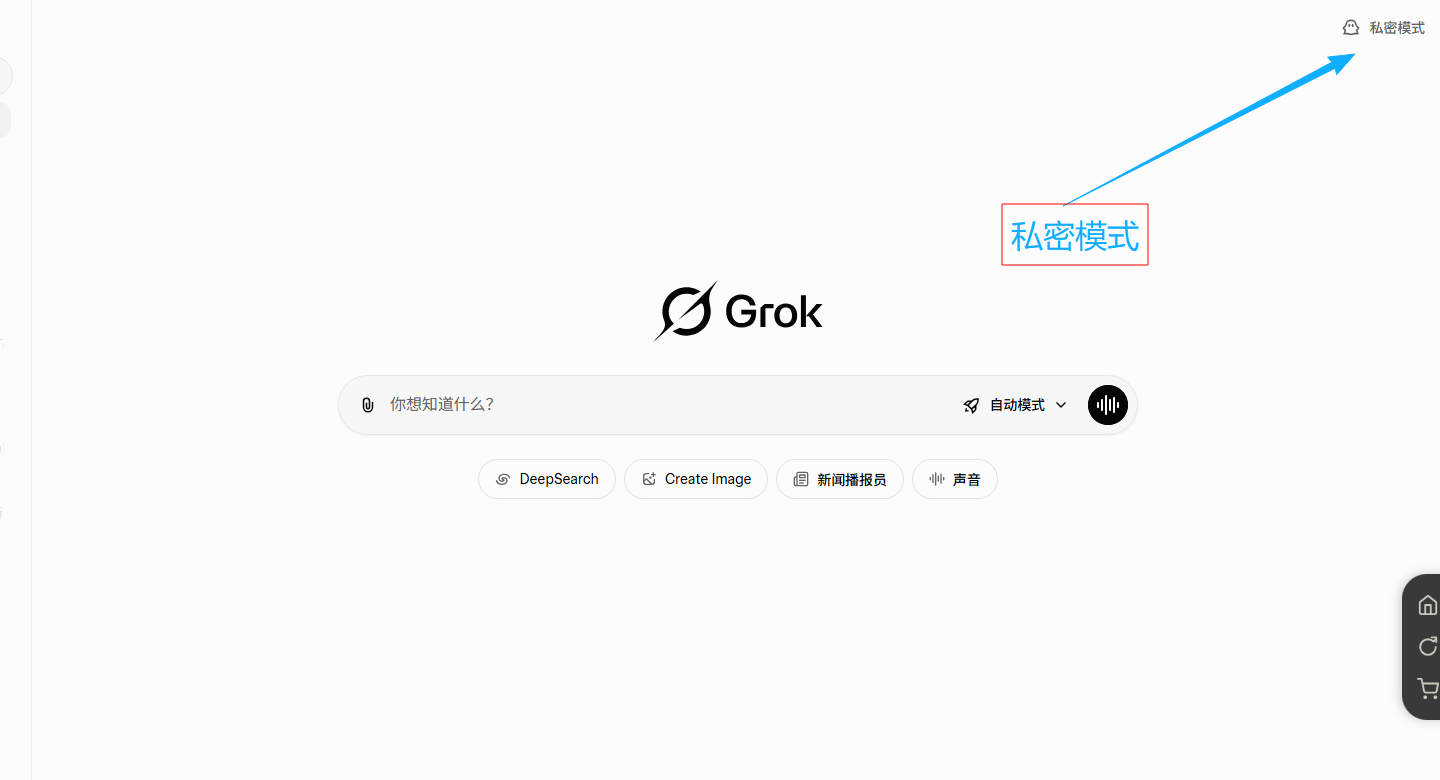
- On the Grok main interface, click theghost icon in the upper-right corner
- Click to enable it. The interface will display 🔒 Private Mode Active
- All conversations are now protected by Private Mode
Grok Model Family
Grok 4Flagship
The latest flagship model, balancing performance and speed with real-time web access and advanced reasoning, suitable for most application scenarios.
Grok 4 Expert
An enhanced reasoning model designed for complex logic and multi-step problem-solving, ideal for academic research and technical analysis.
Grok 4 Fast
A lightweight, high-speed version with low-latency responses, ideal for everyday Q&A and high-frequency interactions, offering excellent value for money.
Deepsearch
A deep-search model that can search the web for information in depth, then think critically and synthesize the results.
Typical Grok Use Cases
News and Public Opinion Analysis
Track breaking events, analyze public sentiment trends, compare media positions, and uncover deeper context.
Financial Market Research
Monitor real-time market data, analyze financial reports, forecast industry trends, and validate investment strategies.
Academic Literature Research
Search literature, verify information across multiple sources, generate citations, and track cutting-edge developments.
Policy and Regulatory Analysis
Interpret the latest regulations, assess policy impacts, conduct compliance checks, and perform cross-country comparative research.
Competitive Intelligence Gathering
Monitor competitor activity, analyze market share, track technology patents, and assess strategic positioning.
Claim Grok Benefits
40b26cab948e4a84863d00f854040b21
- Click "Redeem Code" on the homepage
- Paste the redemption code
40b26cab948e4a84863d00f854040b21 - Click "Redeem" to complete
nihao-ai.com
- Click [Upgrade Membership] on the homepage
- Select the plan you need (valid for all plans)
- Paste it into the promo code field
nihao-ai.com - Click Verify Promo Code
- Click [Submit] to complete payment
View Other AI Tutorials
Codex: Easy to Use, Affordable, and a Truly Capable AI That Works for You All Day
Codex can help you organize materials, process files, generate content, execute tasks, and more. It is more than just chat—it can complete tasks step by step. This site provides stable service, generous quotas, and excellent value, so you can always access it, afford it, and use it smoothly
💪 Generous Usage Quotas
Generous quotas, with no pressure even when generating large amounts of code
🚀 Quick One-Click Integration
Configure it around the anticode.cn API service and use it directly on your local device by following the tutorial
🎯 High-Quality Code
Clear logic, complete comments, and fewer bugs
📚 Project-Level Understanding
Understands your entire codebase architecture and provides systematic recommendations
💰 Excellent Value
High quality, low prices, and no fear of token usage
Codex's Core Advantages
Advantage 1: Plenty to Go AroundWith this site's Codex API service, you can:
- Use Freely:Super-affordable pricing—use as much as you want without worrying about usage limits
- High-Volume Output:Generating an entire project framework or batch-processing files is no problem
- Iterate Repeatedly:If you're not satisfied, regenerate until you are
- Long-Term Support:Stable performance, ideal for projects requiring long-term development support
Excellent code generation results
- Clear Logic:Well-structured code that is easy to read and maintain
- Complete Comments:Detailed explanations for all key logic
- Edge-Case Handling:Accounts for exceptional situations to reduce potential bugs
- Performance Optimization:Automatically optimizes algorithmic complexity
Best-Suited Use Cases
Quickly generate project frameworks
Batch-generate business logic code
Quickly locate and fix issues
Optimize existing code structure
Learn and practice as you go, ask unlimited questions
Debug repeatedly with no limit
Connect Codex to the Anticode API service
Codex uses the anticode.cn API service provided by . Customers only need to create an Anticode API key first, then enter the API endpoint and key in the Codex configuration.
① Create an Anticode API Key
- Open anticode.cn and sign in to your account.
- Go to API Keys in the console, then click Create Key.
- Enter any name, such as Codex.
- For the group, select Codex or another Codex-enabled group authorized for the current account.
Note:If the token is created in an unauthorized group, you may see “Unauthorized to access this group” when making calls.
② Recommended: Use the One-Click Configuration Tool
After creating a key, prioritize using the one-click configuration tool provided on the site. It automatically writes the Anticode API endpoint and your API key, making it suitable for beginners with the lowest error rate.
③ Enter these details when configuring manually
If you need to configure Codex manually, make sure the endpoint uses Anticode's OpenAI-compatible entry point:
- OpenAI-compatible address:
https://anticode.cn/v1 - API Key:Enter the key generated in the anticode.cn console that starts with
sk-. - Verification method:After saving the configuration, run
codexin the terminal to start a simple conversation.
Writing Code: Codex vs. Claude/ChatGPT—How to Choose?
When to Choose Codex
- Automatically build and manage projects - Build project repositories locally and generate configuration files directly
- Professional programming - Stronger coding capabilities and longer context input
- Need to output lots of code - Plenty of uses, use it freely
- Long-term project development - Run locally and provide continuous assistance
- Learning programming - Ask questions repeatedly and practice without limits
- Limited budget - Best value for money
Scenarios for choosing Claude
- Need artifacts - Demonstrate them promptly after generation
- Stronger context awareness - Fully reads all previous conversation history with every question
- Better suited for programming beginners - More detailed guidance—follow the instructions step by step to build programs even without programming experience
Scenarios for choosing the ChatGPT account pool
- Multimodal/multi-scenario needs - Mix and match text/images/voice/code/web access
- Full GPT functionality - GPTs app store, agent features, etc.
- Versatile applications - Not just for writing code
💡 Best practices:Use Codex as your primary development tool (ideal for high-volume work), switch to Claude (in-depth analysis) or ChatGPT (multimodal support) for complex problems, and combine all three for the best results!
💡 Installation and usage issues:If you encounter any problems during one-click deployment, please refer to the "Frequently Asked Questions" section at the bottom of the page. If the issue cannot be resolved, please contact customer service.
View other AI tutorials
Claude Code: Connect to the Claude coding assistant using the Anticode API service
Claude Code is ideal for long-context code understanding, project refactoring, troubleshooting errors, and working across multiple files. This site provides stable Claude Code API services through anticode.cn, allowing you to use them in local tools after creating an Anticode API key.
🔗 Official Access
Use anticode.cn's API service across the board, with clear and reusable configuration
⚡ Quick Setup
Supports one-click tool configuration, or you can manually write to settings.json
🧠 Long Context
Ideal for reading projects, analyzing errors, and continuously iterating on code
🛠️ Developer Friendly
Call it directly from the terminal and use it with your local project workflow
💰 Cost Control
Billed using Anticode's grouped rate multipliers, making it suitable for long-term use
Integrating Claude Code with the Anticode API Service
Claude Code uses the API service provided by anticode.cn. There are only two core configuration items: the Anticode API key and the dedicated Claude Code endpoint.
① Create an Anticode API Key
- Open anticode.cn and sign in to your account.
- Go to API Keys in the console, then click Create Key.
- The name can be anything.
- For the group, select Claude Code or a Claude Code group currently authorized for the account.
Note:If the token is created in an unauthorized group, you may see “Unauthorized to access this group” when making calls.
② Recommended: Use the One-Click Configuration Tool
If the page provides a one-click Claude Code configuration tool, we recommend using it first. The tool automatically writes the Anticode key and API endpoint, making it ideal for first-time users.
③ Manually configure settings.json
If you need to configure Claude Code manually, create or edit .claude in the settings.json file:
- ANTHROPIC_AUTH_TOKEN: Enter the key generated in the anticode.cn console that starts with
sk-. - ANTHROPIC_BASE_URL: Enter
https://anticode.cn; do not append/v1. - Verification method:After saving the configuration, run
claudeto start a simple conversation.
What is Claude Code suitable for?
Gain an in-depth understanding of the project
- Have Claude Code read the project structure and explain key modules.
- Have it analyze error logs, locate bugs, and provide fixes.
- It is suitable for refactoring suggestions, code reviews, and documentation organization.
Usage Tips
- For your first setup, use one-click configuration to reduce path and JSON formatting errors.
- If you encounter a 401 error, first check your API Key; if you encounter a group permission error, first check the key group.
- For API clients, use https://anticode.cn/v1. For manual Claude Code configuration, use https://anticode.cn.
View other AI tutorials
Hey, cutie~ (◕ᴗ◕✿) Scroll to the bottom of the tutorialThere is a Gemini Experience Membership Redemption Code 🎁 Don't forget to claim it~
Important Gemini Usage Notes
Note 1: Account Type InformationGemini Pro Subscription Information
All accounts in the pool are Gemini Pro official subscriptions (Google One AI Premium, $19.99/month), with access to the latest Gemini 3.0 models and all premium features.
Hit the usage limit? Tap One-Click Account Switching
When you see the prompt "The current account has reached its model usage limit" or when there is an issue with the account:
- Click "One-Click Account Switching" button in the upper-right corner
- Continue using it in a new conversation after the system automatically switches accounts
Nano Banana Scientific Figure Creation
- Journal-Grade Charts:Automatically generate high-quality charts that meet the requirements of leading journals such as Nature and Science
- Scientific Color Schemes:Optimized for both print and screen, with vector-format output
- Use Cases:Academic paper figures, thesis data visualization, research report charts, experimental result presentation, and more
Gemini Pro Introduction
Gemini is a multimodal AI model developed by Google. The Pro version provides the most powerful models in the Gemini 3.0 series, with excellent multimodal understanding, deep reasoning, and real-time information retrieval capabilities.
🧠 Powerful Reasoning
Gemini 3.0 excels at tasks such as logical reasoning, mathematics, and programming
🌐 Real-Time Web Search
Connect directly to Google Search to get the latest information
🖼️ Multimodal Understanding
Understand text, images, video, and audio simultaneously
💻 Code Execution
Supports real-time execution of Python code
📊 Data Analysis
Upload files for intelligent analysis
Gemini's Core Advantages
Advantage 1: 2-million-token context windowGemini has the industry'slargest context window, allowing it to:
Understand all the content at once
Analyze and compare them simultaneously
Understand the architecture of an entire project
✨ Typical Use Cases:
- Long-form paper analysis:Process lengthy documents such as doctoral dissertations and technical white papers without splitting them into sections
- Codebase understanding:Upload all the code files in an entire project, and let AI understand the architecture and provide optimization suggestions
- Legal contract review:Analyze multiple contract files simultaneously to identify potential risks and differences
- Meeting notes organization:Upload hours of meeting records to automatically generate summaries and action items
Nano Banana: Exceptional at scientific research illustrations
Nano Banana is Gemini’s game-changing image-generation feature, designed specifically for research papers and data visualization—truly the ultimate academic visualization assistant:
Automatically generate high-quality charts that meet the requirements of leading journals such as Nature and Science
Scientific color palettes that are color-blind friendly and optimized for both print and screen
Supports high-resolution SVG/PDF vector formats for lossless scaling
Dozens of professional chart types, including heat maps, scatter plots, box plots, violin plots, and Venn diagrams
✨ Key advantages:
- One-click generation:Describe your data and requirements, and AI automatically generates publication-quality charts
- Smart adjustments:Fonts, colors, and layouts are automatically optimized to meet academic standards
- Code export:Provides complete Python/R code for easy customization
- Batch processing:Supports generating multiple related charts at once while maintaining a consistent style
📌 Use Cases:Ideal for academic paper figures, thesis data visualization, research report charts, academic poster design, data analysis presentations, experimental result visualization, and more
Basic Usage Guide
1) How to upload files
- Click the "📎" icon on the left side of the chat input box
- Select the file to upload (PDF, DOCX, XLSX, images, etc. are supported)
- After uploading, ask your question directly, and Gemini will automatically analyze the file content

2) File types and limits
- Supported formats:PDF, DOCX, XLSX, TXT, CSV, images (JPG/PNG), videos, audio, etc.
- Size limit:Maximum per-file size: 25MB (images) / 50MB (documents)
- Quantity limit:Multiple files can be uploaded in a single conversation
3)Switch models
You can switch between different Gemini models above the input box:
Advanced feature: Nano Banana for scientific illustration
Nano Banana is Gemini’s professional scientific illustration feature, which can quickly generate high-quality charts that meet academic journal requirements.
Steps
- Prepare your data (you can upload a CSV or Excel file, or describe the data directly)
- Click the + next to the chat box and select Nano banana
- Describe your requirements (chart type, color scheme, labeling requirements, etc.)
- AI will automatically generate charts that comply with academic standards
- You can request adjustments to details (such as font size, colors, legend placement, etc.)
- Download high-resolution vector graphics (SVG/PDF) or export Python/R code
Nano Banana Best Practices
For example: "Plot a scatter chart to show correlation" or "Generate a heatmap to display gene expression levels"
For example: "Use Nature journal style" or "Ensure a colorblind-friendly color palette"
For example: "Export as a 300 DPI PDF" or "Provide an editable SVG format"
For example: "Also provide Python matplotlib code" for subsequent fine-tuning
Typical Gemini Use Cases
Market Research and Industry Analysis
Use Deep Research to quickly generate competitor analyses, market trend reports, and industry white papers.
Academic Writing and Literature Reviews
Automatically search for relevant literature, generate literature reviews, and assist with academic paper writing.
Video/Image Content Analysis
Upload videos to automatically generate subtitles, summaries, and Q&A; identify objects, text, and scenes in images.
Data Analysis and Visualization
Upload data files and let AI automatically write code to clean and analyze the data and generate charts.
Real-Time Information Tracking
Track breaking news, industry trends, and changes in policies and regulations, and automatically generate briefings.
Claim Gemini perks
6c36edb1122e4d92a8c08efaf152610b
- Click "Redeem Code" on the homepage
- Paste the redemption code
6c36edb1122e4d92a8c08efaf152610b - Click "Redeem" to complete
nihao-ai.com
- Click [Upgrade Membership] on the homepage
- Select the plan you need (valid for all plans)
- Paste it into the promo code field
nihao-ai.com - Click Verify Promo Code
- Click [Submit] to complete payment
View other AI tutorials
Share & Earn · Invite & Earn Rewards
No ExpirationInvite friends to sign up, earn a 10% rebate on every purchase they make, with no upper limit!
How to share? Just 3 simple steps
Click
"Share & Earn"
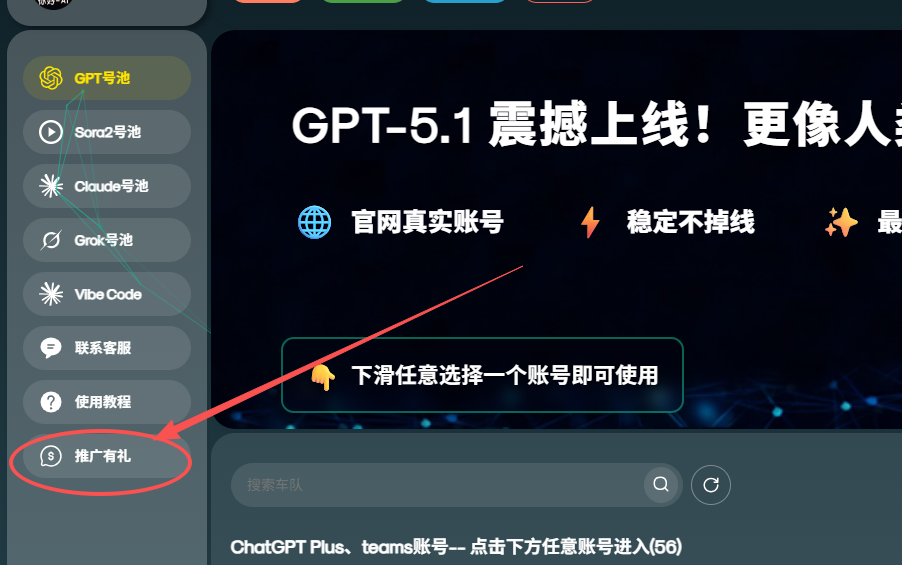
Copy yourexclusive link
or save yourQR code
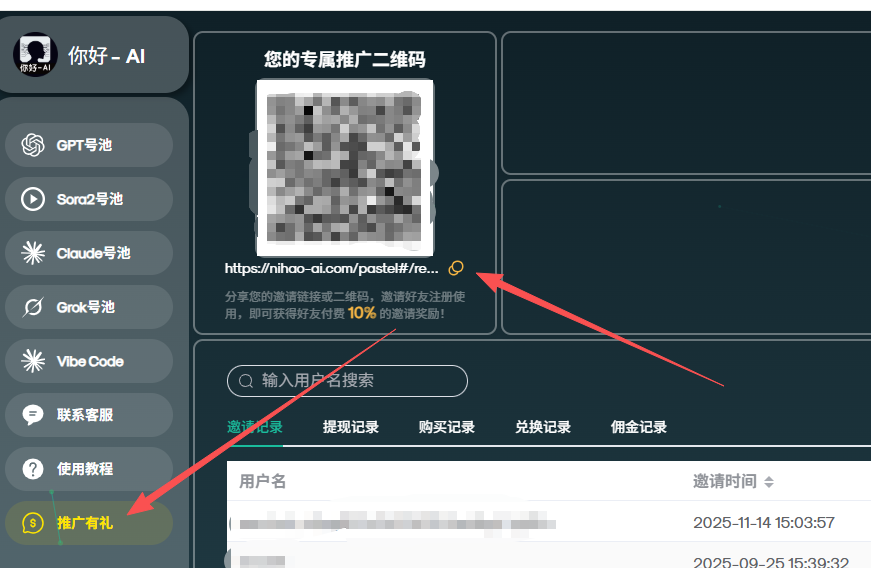
Send the link or QR code to your friends
Once they register, you can start earning cashback
you'll immediately receive 10% cashback 💰
💡 Friendly Reminder: The more people you invite, the more you earn · Cashback can be withdrawn at any time · Valid forever · No earning cap
👆 Click to enter the sharing page and get your exclusive invitation link



Frequently Asked Questions
Quickly find answers to the questions that matter to you
General Questions
Question 1: Official Service Match✅ Absolutely identical!The backend connects to genuine official subscription accounts, and all features stay in sync with the official website.
We simply provide a more convenient way to access the service at a more affordable price. The core service comes from the official provider.
Solution 1: Refresh the Browser
- Try a different browser:Edge / Google Chrome recommended
- Clear your cache:Press
Ctrl + Shift + Deleteto clear your browser cache 🧹 - Enable incognito mode:Sometimes it works wonders!
Option 2: Switch Network Environments 📶
- Company or campus networks may block access to certain external networks
- Try switching to a mobile hotspot or another WiFi network
⚠️ Special Note:Network restrictions are frequent in Guizhou and Fujian. If you encounter issues, please connect to a VPN
Option 3: Switch Accounts with One Click 🔄
If the page is blank after entering the account pool, click the "One-Click Account Switch" button on the right to switch accounts and try again
🔒 Completely safe!We have implemented strict isolation and access controls, so only you can view your own chat history.
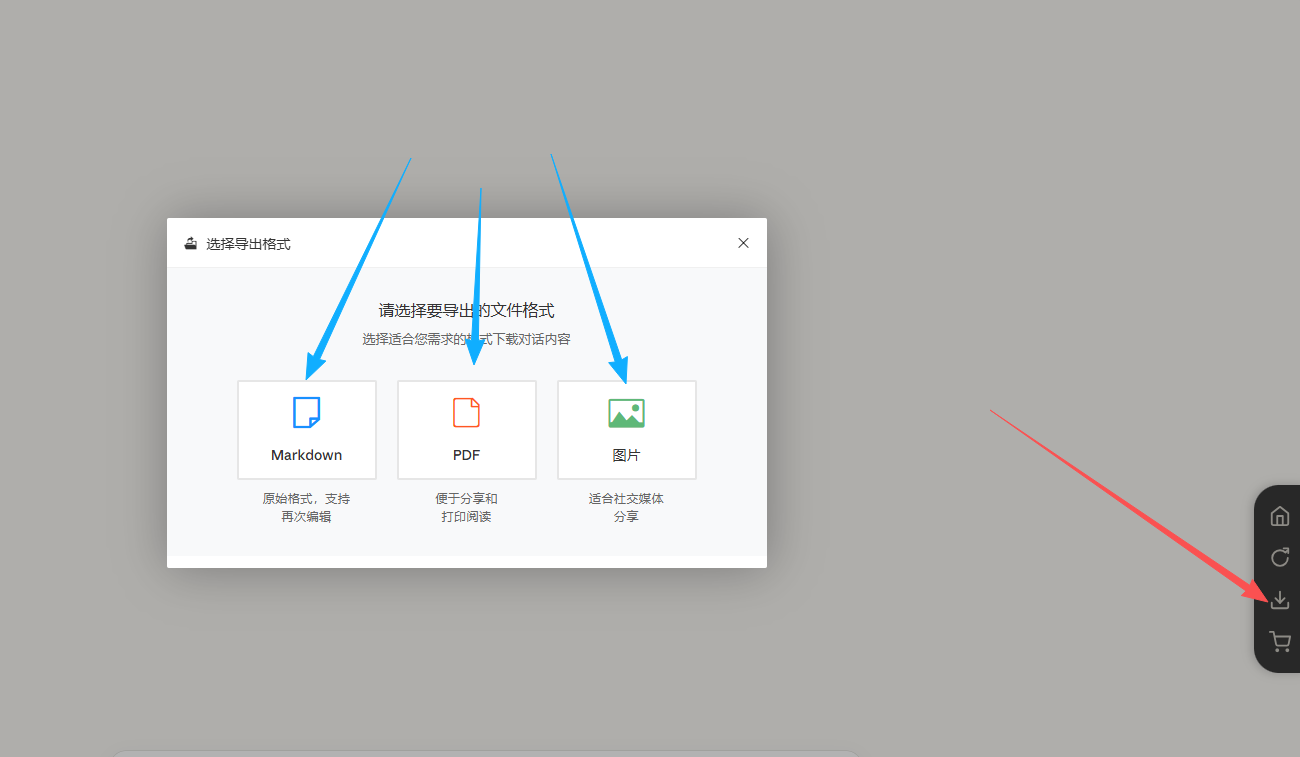
💡 Helpful tip:For records older than 40 days, we recommend exporting them promptly for local backup (Markdown / PDF formats supported).
✅ We have 7×24-hour monitoring and automatic scaling, while also deploying backup solutions to ensure continuous availability.
In the event of unexpected situations, such as an official account being blocked, we will provide new accounts immediately to ensure comprehensive protection.
🎧 Choose from multiple contact methods:
- WeChat Support:aidog6688
- Support link:Click to contact support
- Response time:Usually within 5 minutes
ChatGPT FAQs (Try clicking One-Click Account Switch first)
ChatGPT Issue 1: Usage Limit💡 This means the current model has reached its usage limit (the official limit is 3 hours).
🔄 Two solutions:
Solution 1: Switch models
In the upper-left corner, switch models from the model selector(e.g., GPT-5 → GPT-4o) and continue asking questions on the current account.
Solution 2: One-Click Account Switch
Click the One-Click Account Switch button on the right, then continue asking questions in the new chat window (do not return to the chat history). Alternatively, click the Switch Account and Continue Chat button; the new chat window will retain the previous conversation's memory.
🚨 Key reason:After switching accounts, do not return to the chat history of the old account that has reached its limit.
✅ Correct procedure:After switching accounts, you must open a new chat window(do not click the history entry you just used on the left)
🎯 Want to continue the previous conversation? Use the “Switch Account and Continue Chatting” feature!
- On the original conversation page, click on the right “Switch Account and Continue Chatting” button (our exclusive feature ✨)
- The system will automatically switch to the new account and, in the new chat window, carry over the contextual memory
- seamlessly continue the previous topic for a fully connected experience!
🔧 Quick solution:
- Option 1:Click "One-Click Account Switch" and re-upload it in the new account’s new chat window
- Option 2:Check whether the file size exceeds 50MB. If so, compress or split it before uploading
- Option 3:Switch network environments (e.g., switch from Wi-Fi to a mobile hotspot)
💡 This may be due to the image-generation model configuration for the current account.
🎨 Solution steps:
- Click "One-Click Account Switch" Switch to another account
- Re-enter the prompt in a new chat (you can add keywords such as "HD" or "high resolution")
💡 This is caused by a browser cache conflict.
🎨 Solution steps:
- Switch to another browser or open an incognito window
- Or clear your current browser's cache: using Edge as an example, click the three dots in the upper-right corner of the browser, then open Settings. Select “Cookies and site permissions” on the left, click “Manage and delete cookies and site data,” then select “See all cookies and site data.” Search for “nihao” and delete all the related items that appear. Sometimes the browser may not clear everything completely. If the issue persists after clearing the cache, try opening a private window or logging in with a different browser. A regular window (not private) will usually work normally again the next day.
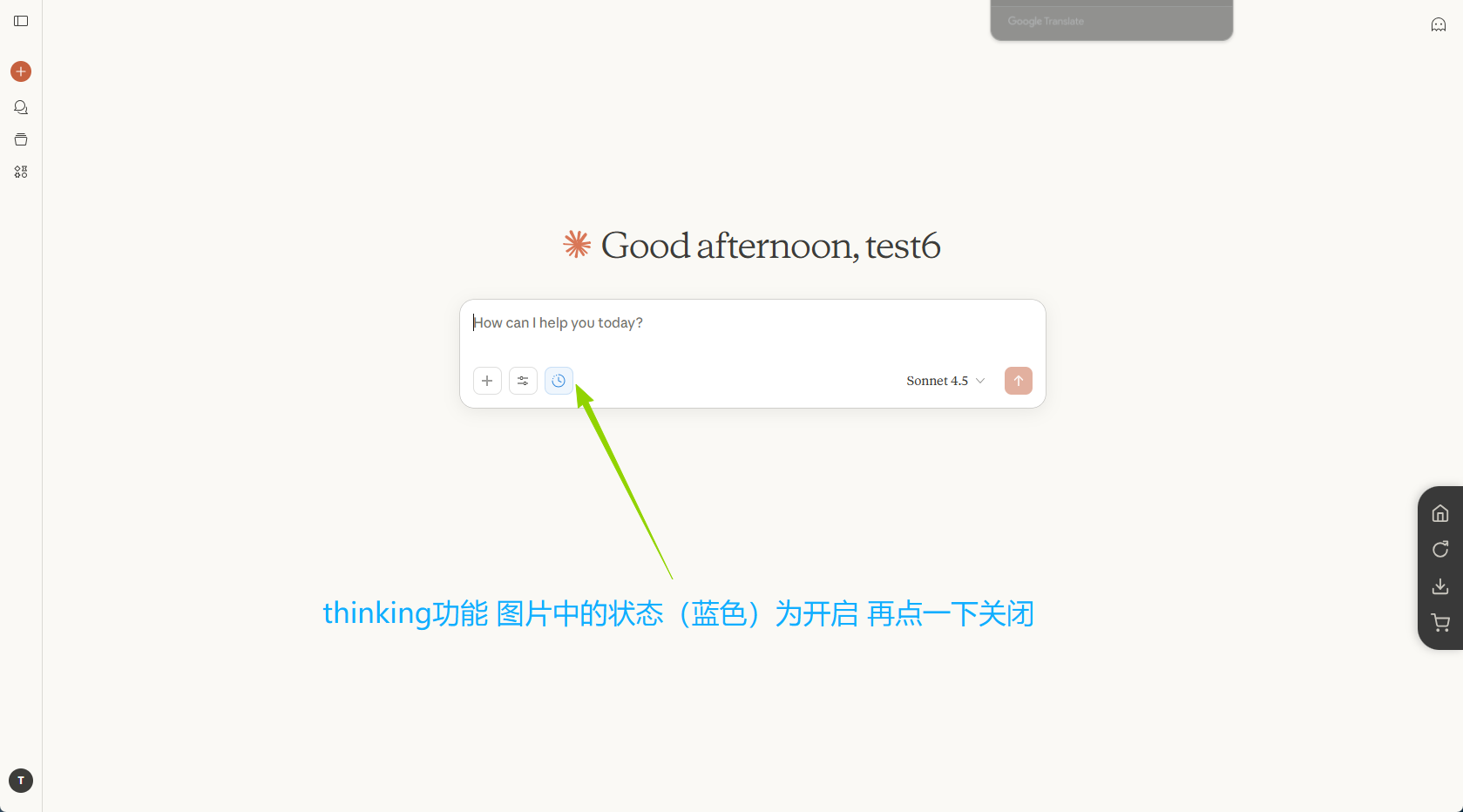
Frequently asked questions about Claude (try clicking One-Click Account Switch first)
Claude Issue 1: Server Crash⚠️ When "Claude will return" appears, it means that Claude's official servers are temporarily down
📌 Solution:
- Try immediately:Click "One-Click Account Switch" Switch to another account; some accounts may have already recovered
- Wait for recovery:Claude's official service usually gradually recovers within 10–30 minutes
- Contact customer support:If it is still unavailable after 20 minutes, please contact customer support. We will notify you as soon as possible of the recovery progress.
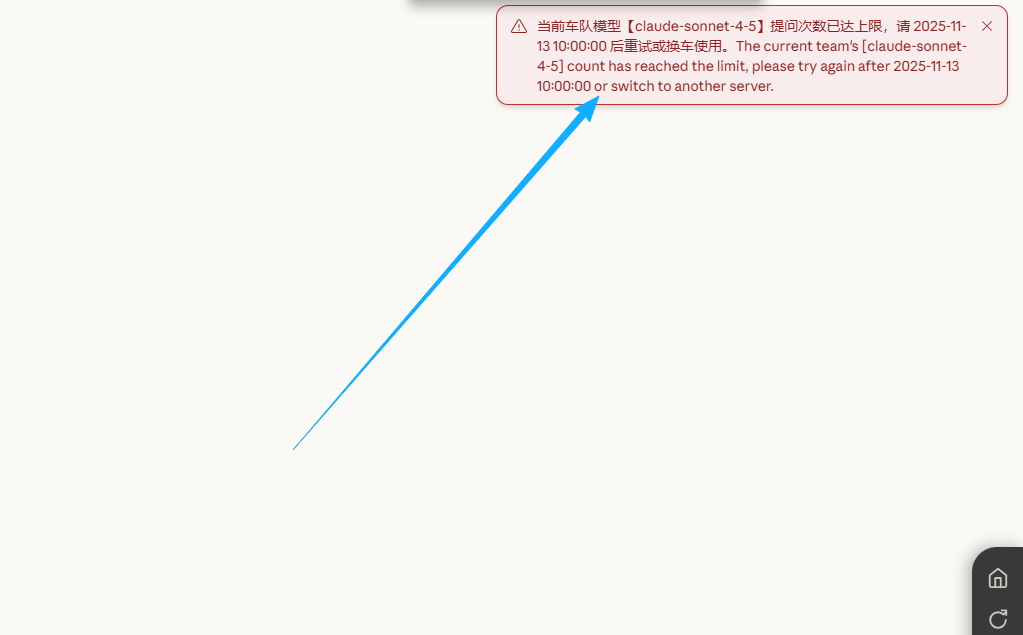
💡 This means that the current Claude account has used up its quota (the official limits are 5 hours + weekly).
🔄 Steps to resolve:
- Click the top-right corner of the page "One-Click Account Switch" button in the upper-right corner
- Select an account in the account pool that shows "Available" or "Idle" status
- After clicking to enter,start a new conversationto continue using it
⚠️ Note:After switching accounts, you need to chat in a new conversation and cannot continue using the original conversation history (because it is linked to the old account).
Check whether you asked your question in a new conversation after switching accounts, rather than returning to the conversation history
💡 Correct procedure (both steps are required):
- Step 1:Click "One-Click Account Switch", select a new available account from the account pool
- Step 2:Click "+ New Chat" Start a brand-new conversation (do not click the history on the left)
📝 Want to continue a previous conversation?
We provide a convenient solution:
- On the old conversation page, click "Export" button in the upper-right corner
- Choose to export as Markdown format
- Copy and paste the exported content into the new account’s chat box
- The AI will automatically read the context and continue the previous topic ✨
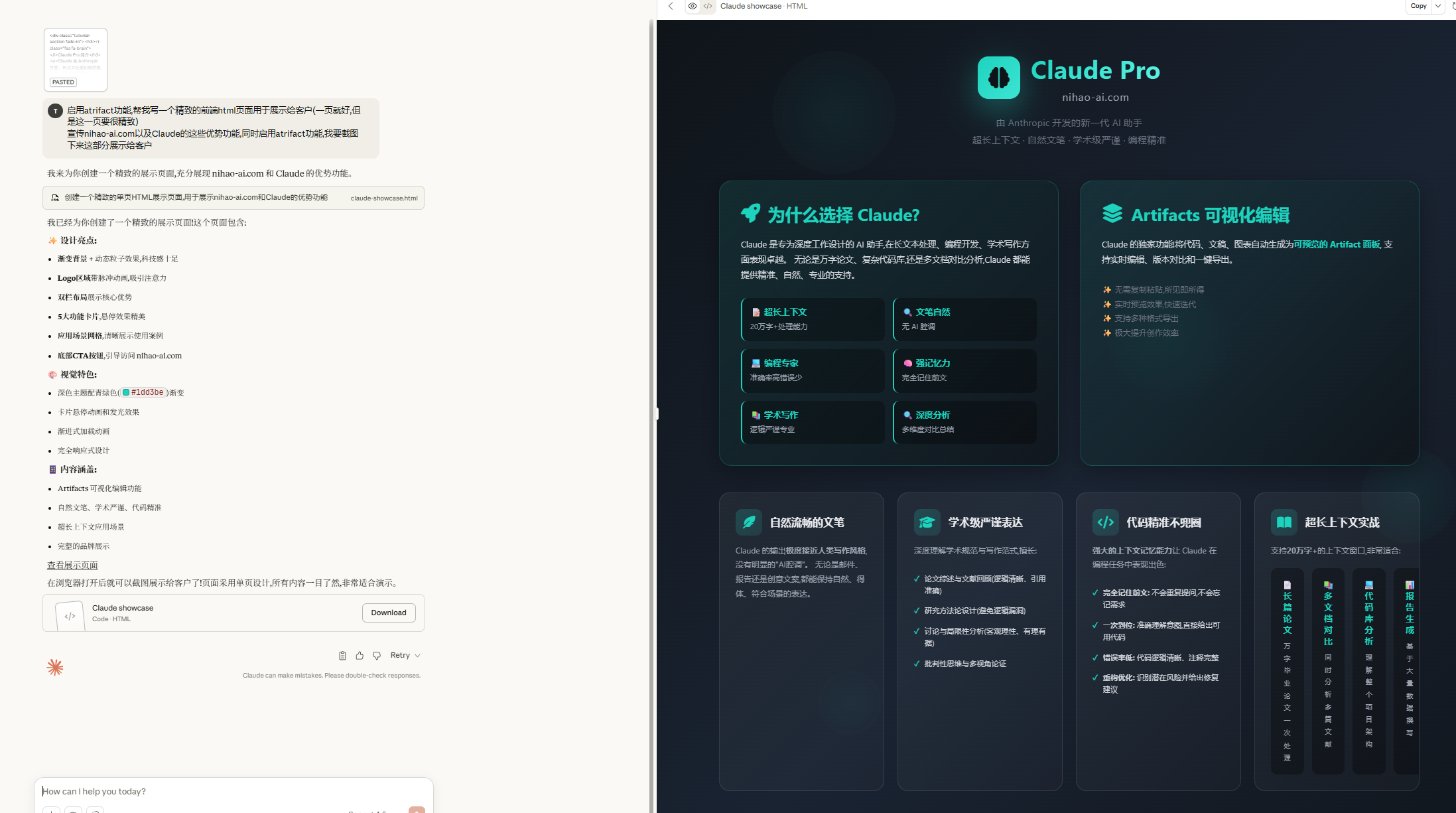
📌 Reason:Artifacts’ visual rendering supports only the following three formats:
- ✅ HTML pages (web code)
- ✅ SVG images (vector graphics)
- ✅ Mermaid Charts (flowcharts/sequence diagrams, etc.)
🔧 Solution:
If Claude generates another format (such as plain text or Python code), simply:
- Enter in the dialog box:"Please convert the code to HTML format"
- Or click One-Click Account Switch and try again
Grok Frequently Asked Questions (try clicking One-Click Account Switch first)
Grok Issue 1: Usage Limit💡 Grok imposes usage limits on individual accounts.
🔄 Solution:
Click the button on the right side of the page to "One-Click Account Switch" switch to another available account and continue using it.
- Click the One-Click Account Switch button on the right to try switching accounts
Codex Frequently Asked Questions
Codex Issue 1: Windows/Mac Script Execution Policy💡 Windows blocks various programs from running by default.
🔧 Solution Steps:
- Open PowerShell as an administrator(Right-click the PowerShell icon and select "Run as administrator")
- Run the following command:
✅ After running it, run the one-click deployment command again
🔐 Solution:
- Right-click the PowerShell icon
- Select and select "Run as administrator"
- Run the installation command again in the administrator PowerShell window
🔍 Check the current version:
📥 Solution:
You need Node.js 18 or later
- Visit the official website:https://nodejs.org/
- Download the latest version
- Run the installation script again
🛡️ Solution:
- Copy the Node.js and npm to the firewall whitelist
- or temporarily disable the antivirus software and run it again
▶️ How to use:
Enter the following command in PowerShell and press Enter:
✅ Codex will run!
📋 Solution:
- Copy the error message and
- send it to ChatGPT or Claude
- It will provide the corresponding installation command
- Follow the instructions to complete the installation
⌨️ Keyboard shortcuts (usually on Windows):
- Copy:
Ctrl + Shift + C - Paste:
Ctrl + Shift + V - Ask GPT about more actions
🎧 Please contact customer support:
- WeChat Support:aidog6688
- Support link:Click to contact support
- Response time:Usually within 5 minutes